💊 Pharmacy and Optical Receipt Templates
Find a layout for pharmacy shopping or an optical purchase. Describe the items and payment clearly, using only the patient or prescription details needed for your record.
Last updated




Choose retail items or a care-related purchase
This collection includes drugstore checkout layouts as well as a Specsavers form. Read the selected editor's fields before assuming it has prescription or insurance details.
- Pharmacy
A general itemized layout for pharmacy purchases, with quantity and unit-price entries.
- CVS
A store layout with purchase details and optional receipt messages.
- Specsavers
Includes patient, frame-reference and optometrist fields for an optical record.
Before you download
- Separate product names, sizes and amounts so similar purchases can be distinguished.
- A template does not verify a prescription, insurance payment or claim eligibility. Obtain pharmacy-issued documentation when that is required.
What pharmacy and optical receipts usually show
A pharmacy receipt from a drugstore checkout looks much like any retail receipt: store details, a transaction reference, item lines, tax and payment. The differences are in the details. Many pharmacy layouts mark which items are taxable, assign tax categories or add a loyalty section, such as Boots Advantage Card or Shoppers Drug Mart Optimum notes. The Safeway layout goes further and separates pharmacy, grocery and health purchase groups, with room for prescription references where they are needed. Store, pharmacist or colleague references often sit near the top or bottom of the slip.
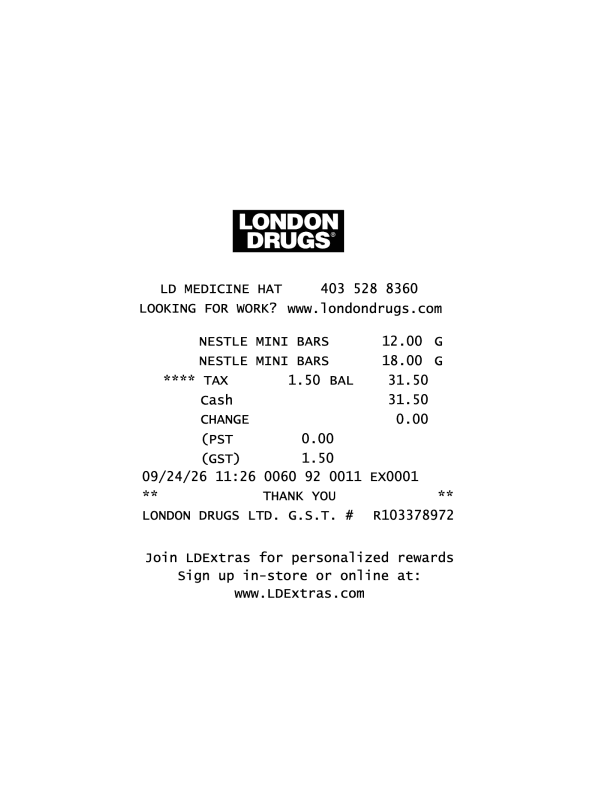
Optical receipts are closer to a service record. The Specsavers layout includes a patient name, frame reference and optometrist details next to the charges. Tax labels vary by country as well. The CVS and Walgreens layouts use per-item tax markers and categories, London Drugs shows separate GST and PST amounts, and Chemist Warehouse and Boots follow their own store formats. Choose a layout with labels that match where you shopped, and include only the health details that your record actually needs.
How to choose a pharmacy receipt template
Match the layout to the store and the type of purchase. For a drugstore visit, use the seller's own layout if it is listed, such as CVS, Walgreens, Rite Aid, Boots, Shoppers Drug Mart or Chemist Warehouse. If you operate a pharmacy or the store is not listed, the general pharmacy layout lets you enter your own store name, contact details, quantities and unit prices. For glasses or frames, Specsavers is the optical option here. Check the tax markers before downloading, because a mix of taxable and non-taxable items changes the total.
Keep personal health information to a minimum. A product name, quantity and amount are usually enough for a household or expense record. If you need a document for an insurer, a reimbursement account or another claim, ask the pharmacy for its own receipt or printout, because the plan decides what evidence it accepts and a template cannot confirm a prescription.
Pharmacy receipt templates compared
| Template | Layout | Fields to fill in | Best for |
|---|---|---|---|
| Pharmacy | General itemized pharmacy receipt | Store name, contact details, quantities, unit prices, tax, payment reference | Independent pharmacies or unlisted stores |
| CVS | Drugstore receipt with taxable item markers | Item descriptions, line amounts, taxable flags, checkout references, cash or card | CVS purchases with mixed tax status |
| Walgreens | Store receipt with item tax categories | Product IDs, item amounts, OTC labels, tax categories, receipt notes | Walgreens purchases including OTC items |
| Rite Aid | Checkout receipt with notes below payment | Item amounts, tax markers, store and checkout references, notes | Rite Aid purchases that need extra notes |
| Boots | Store receipt with Advantage Card notes | Store and colleague details, item charges, payment, points notes | Boots purchases with loyalty points |
| Shoppers Drug Mart | Store receipt with pharmacist and Optimum notes | Item charges, store and pharmacist details, Optimum card and points | Shoppers Drug Mart purchases with Optimum points |
| London Drugs | Cash sale receipt with GST and PST | Retail items, tax codes, cash tender, change, register references | Cash purchases with separate GST and PST |
| Chemist Warehouse | Itemized receipt with a pharmacist reference | Store, pharmacist, transaction reference, line charges, tax, payment | Chemist Warehouse shopping trips |
| Safeway | Grouped receipt for pharmacy and grocery items | Pharmacy, grocery and health groups, prescription references, tax, payment | Mixed pharmacy and grocery shopping |
| Specsavers | Optical receipt with patient and optometrist | Patient name, frame reference, optometrist details, item charges | Glasses or frame purchases |
Frequently asked questions
Questions about choosing and completing these receipts.
Do all forms include a prescription number?
Can I retrieve my pharmacy purchase history?
Will entering insurance details calculate a copay?
Should I include prescription details on my copy?
How do I record items with different tax treatment?
Can I record loyalty points or rewards?
What is the best way to store pharmacy receipts?
Looking for a different type of receipt?
Browse the full catalog for other stores, services and types of payment.