Bellagio Restaurant Receipt Generator
Edit a restaurant check with table, server and cover details. Add quantities and unit prices, review service tax, and download the finished check.
Last updated
A dining check for a hotel restaurant
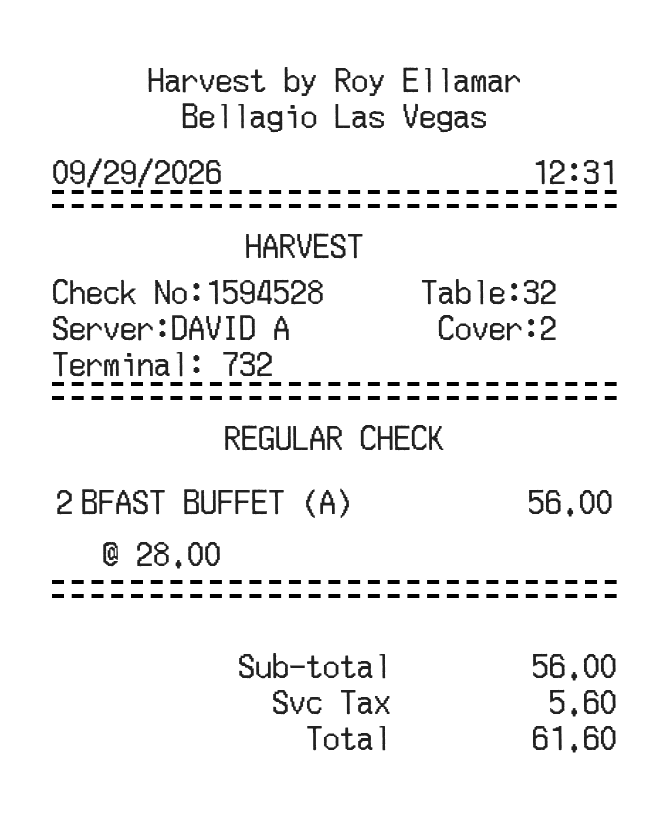
The Bellagio page uses a restaurant-check layout. It includes a table, server, cover count, terminal and check number, followed by food or drink items. Use the Hotel and Restaurant fields to identify the venue. This template has no guest-stay dates, room nights or hotel-folio balance.
Bellagio dining checks and hotel folios
Meals at Bellagio restaurants are settled on a dining check or charged to the room. MGM's terms let hotel guests charge purchases to the room from anywhere in the resort, and those charges then appear on the hotel bill, which MGM calls the folio or hotel receipt. The folio lists the room rate, the $55 daily resort fee plus tax, any additional-occupant charge, room charges and lodging taxes, which on the Strip are 13.38% and also apply to the resort fee.
How to get a copy of a Bellagio receipt or folio
If you gave a card at check-in, MGM emails the bill on your departure day. For a past stay, Bellagio sends you to mgmresorts.com/folio, a Guest Receipt Form that asks for the confirmation number, last four digits of the card used at check-in, hotel, name, email and arrival date; you can also call Guest Services at 888.987.7111. Restaurant meals charged to the room are listed on that folio.
Details on the dining check
| Section | Details |
|---|---|
| Venue | Restaurant and hotel names |
| Service | Table, server, covers and terminal |
| Items | Description, notes, quantity and unit price |
| Totals | Item subtotal, entered service-tax percentage and total |
Related receipt guides
Check the order and tax setting
- Replace the venue and service details.
- Enter each ordered item with its quantity and unit price.
- Review item notes and the service-tax percentage.
- Compare the total with your record, then save a PDF or PNG.