Booking.com Receipt Template
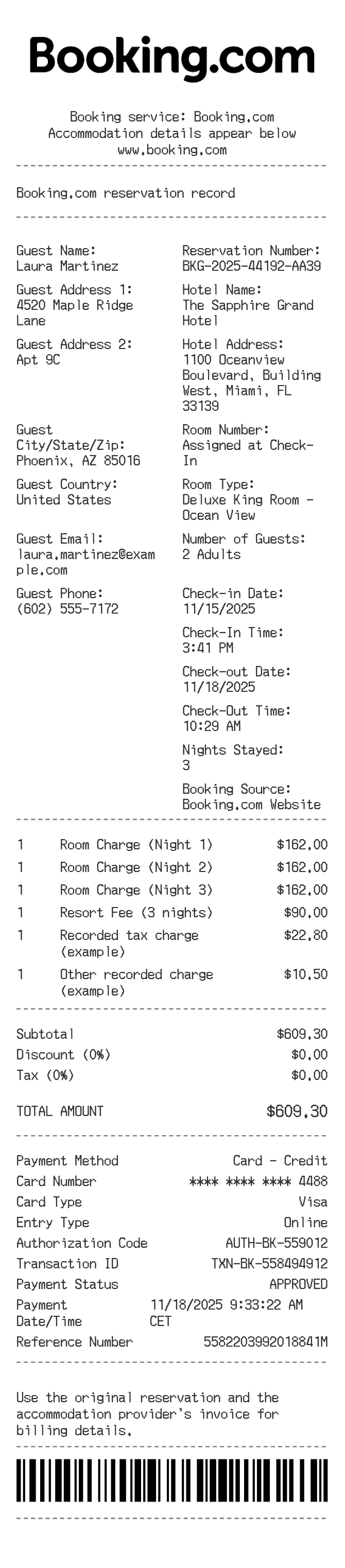
Keep the booking reference and property details alongside the stay charges. Edit the guest information, review the amounts and export your own receipt layout.
Last updated
Keep the booking service and hotel distinct
A booking reference and a hotel folio describe different parts of a trip. This template gives the booking service its own header while keeping the actual hotel name and address beside the guest and stay details. It is an independent editor; entering a reservation number does not retrieve or verify a Booking.com reservation.
Booking.com confirmations versus hotel invoices
A Booking.com stay can produce two different documents. Booking.com for Business says it does not issue invoices itself; your booking confirmation holds a detailed price breakdown and payment receipt, while invoices for accommodation are always provided by the property. Booking.com's customer service page adds that the property is generally responsible for charging your card, usually at check-in or check-out, unless the confirmation states that Booking.com handles payment. A property may also place a pre-authorization, a validity check that temporarily blocks roughly the cost of the reservation, or take a deposit or prepayment shown in your confirmation.
For a US business trip, IRS Publication 463 says a hotel receipt is adequate evidence if it shows the hotel's name and location, the dates you stayed and separate amounts for charges such as lodging, meals and telephone calls. The under-$75 receipt exception never applies to lodging. If you need an itemized bill for an expense claim, request the property's invoice rather than relying only on the Booking.com confirmation. For flights booked through Booking.com, proof of payment can be downloaded from the flight confirmation page, and car rental receipts are available under Manage booking.
How to get an invoice or receipt for a Booking.com stay
In a Booking.com for Business account, go to Bookings & trips, choose the stay, select Request invoice and message the property to have your VAT or GST invoice emailed to you. When searching, the Easy invoice label and filter point to properties that are reliable at providing tax invoices. For a personal booking, use Manage booking or your confirmation email to contact the property, which Booking.com says usually knows the details of your stay best.
If you can't find your confirmation email, check your inbox, spam and junk folders, then go to booking.com/help to have it resent. Keep that Booking.com receipt with the property's invoice, since together they show what you booked and what you paid.
Booking and accommodation information
| Section | Details |
|---|---|
| Booking | Reservation reference and booking source |
| Property | Hotel name, address, room and guest count |
| Stay | Check-in/out dates and separate nights text |
| Charges | Quantity and unit price, discount and tax |
| Payment | Method and transaction references entered from your record |
Related receipt guides
Match the record to the payment being described
- Identify the accommodation separately from the booking platform.
- Replace the guest and reservation examples.
- Enter room and service charges, checking that tax is not counted twice.
- Review payment information and remove unused notes before saving.
FAQs
Official sources
- Booking.com for Business: requesting an invoice
- Booking.com for Business - How can I get my invoice?
- Booking.com - Customer Service
- IRS Publication 463 - Travel, Gift, and Car Expenses