Omni Hotel Receipt Generator
Itemize changing nightly rates, dining and parking with the guest and folio details. Check quantities, adjustments and payment notes before downloading.
Last updated
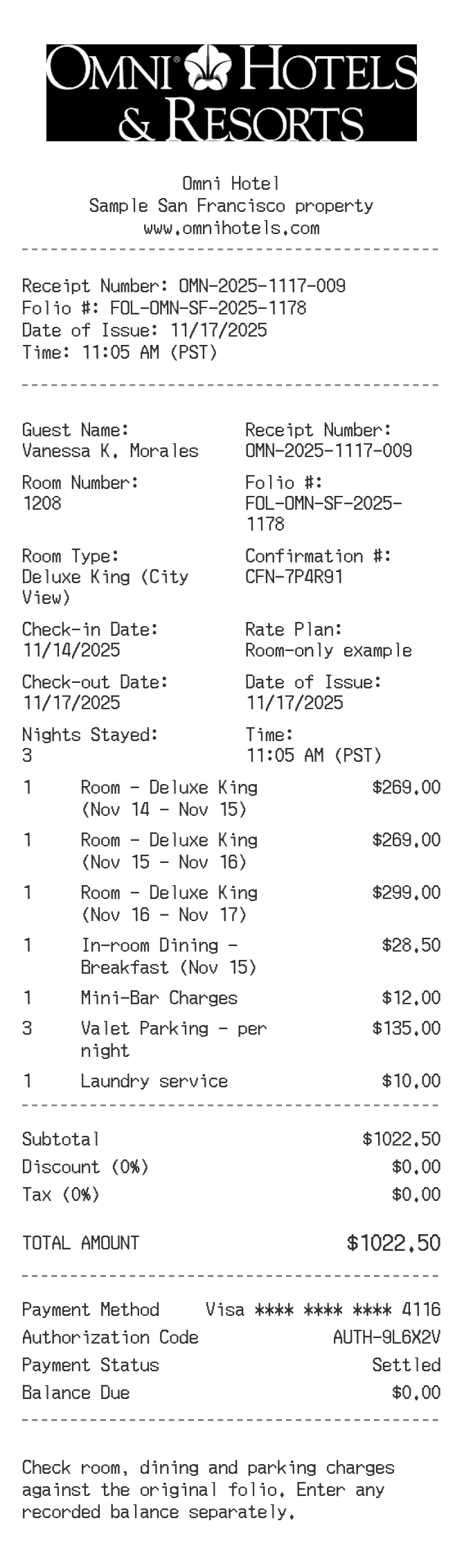
Show a stay with different nightly rates
The Omni example uses separate room rows for nights with different prices, alongside dining and parking. Guest information sits beside folio, confirmation and rate-plan references. The item list calculates the charges, while stay dates and payment-status notes remain independent entries.
What an Omni hotel folio records about your stay
An Omni Hotels folio is the running bill for a room. It also drives Select Guest rewards. Omni says Tier Dollars count room rate, resort or destination service charges, food and beverage, retail, spa, golf and activities charged to the member's room folio. Members and Insiders earn 5 Omni Credits per qualifying night, and Champions and Icons earn 10. Every $100 spent beyond the room adds 1 credit, but room rates, taxes, fees and gratuities don't count toward those extra credits. Credits can take up to seven business days after check-out to post. Stays booked through online travel sites don't qualify, and charges in other currencies are converted to US dollars at check-out.
For business travel, the IRS says a hotel receipt supports your expenses if it shows the hotel's name and location, the dates you stayed, and separate amounts for charges such as lodging, meals and telephone calls. The rule that lets you skip receipts for expenses under $75 doesn't apply to lodging, so keep the folio for every stay. If a hotel bill puts lounge entertainment on the same bill as your room, Publication 463 says you must split the cost on a reasonable basis.
How to get a copy of an Omni Hotels folio
Omni says Select Guest members can retrieve their hotel bill by logging in, opening Past Stays and choosing View Charges. Guests can also use the Omni Contact Us form and choose Billing or Folio Inquiry. Its options include retrieving a hotel bill, asking for itemized receipts for dining or other charges, and requesting a folio correction.
Omni notes that this email channel isn't secure. It doesn't accept tax exemption forms, third-party payment authorizations or card numbers. To authorize a charge to someone else's card, call 888-444-6664 and ask for an email link to Omni's authorization form.
Room and service details
| Section | Details |
|---|---|
| Stay | Guest, room, arrival/departure and nights |
| References | Receipt, folio, confirmation and rate plan |
| Items | Nightly room rates, dining and other charges |
| Totals | Quantity times unit price, discount and tax |
| Payment | Entered method and status notes |
Related receipt guides
Check the rate plan against charged services
- Replace the property and guest information.
- Describe each nightly rate or service in its own row.
- Check that package inclusions are not also charged unintentionally.
- Review quantities, tax and payment notes before export.
FAQs
Official sources
- Omni Hotels - Contact us and folio retrieval
- Omni Hotels - Reservations FAQ
- Omni Hotels - Select Guest FAQ
- IRS - Publication 463, Travel, Gift, and Car Expenses