GameStop Receipt Generator
Add games, accessories or collectibles with product codes and line amounts. Choose taxable items, review discounts and payment details, then download.
Last updated
Set tax and optional discounts for the right products
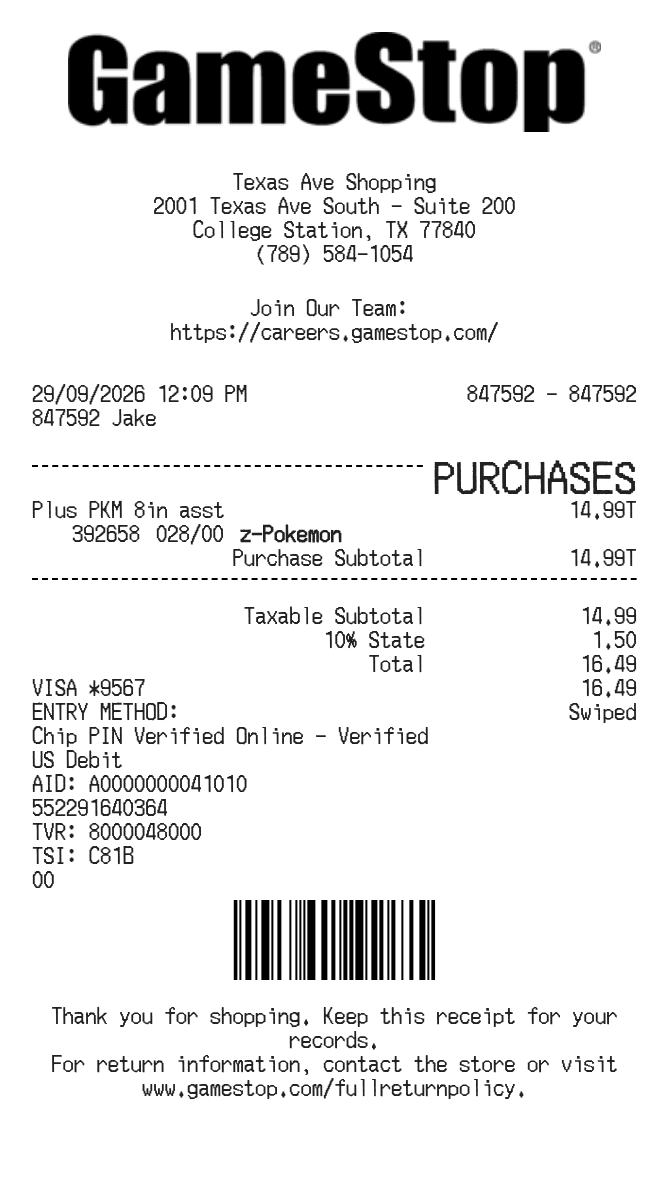
The GameStop layout gives each item a description, SKU, department code and product label. You can mark individual rows as taxable and use the item options to show a discount or promotional reference. The preview separates the purchase subtotal from the taxable subtotal before displaying the final amount.
What counts as a GameStop receipt for returns
GameStop accepts several records as valid proof of purchase: the original sales receipt, the GameStop.com order number, the order confirmation email, the packing slip or a return barcode. In a store, staff ask for an in-store receipt or a GameStop.com order number. Returns may also require a government ID, such as a U.S. driver's license, state ID, military ID or passport, except where law prohibits it. Refunds go back to the original form of payment. A gift receipt gets a GameStop gift card or an even exchange instead, and a return where a Pro reward, coupon or discount was redeemed may get an adjusted refund.
The date on a GameStop receipt matters because the windows are short. Unopened new products, including software, hardware, accessories, collectibles and unworn apparel with tags, can be returned within 15 days. Special or collector's editions, pre-owned products, PCs, PC components, laptops, TVs and monitors have 7 days. Pro members get 30 days on unopened new software and hardware, and can exchange defective pre-owned items within 30 days instead of 15. Clearance and final-sale items, trading cards, blind items, digital products and opened new products can't be returned, although defective items can be exchanged within the return window.
How to find a GameStop order or receipt record
For online orders, sign in to My Orders on GameStop.com, where each order and item shows its status and Order Details holds tracking or pickup information. GameStop sends an order confirmation email shortly after checkout, and that email or the order number counts as proof of purchase. Guest checkout is allowed, but GameStop says an account makes orders easier to track, manage and return. Items bought in a store must be returned in a store, so keep the printed receipt.
Online purchases can be returned in store for free or shipped back for an $8.99 fee, and shipped console returns carry a $14.99 fee. Items over $500 bought online can't be returned in store. Claims for lost or delivered-but-not-received orders must be made within 60 days of the shipment date.
Product-level controls in this editor
| Section | Details |
|---|---|
| Products | Description, SKU, department and full line amount |
| Taxable items | A separate checkbox for each row |
| Discounts | Optional entered discount amount and promotional references |
| Checkout | Transaction, register and cashier entries |
| Payment | Card suffix, entry method and authorization-related notes |
Related receipt guides
Check the taxable subtotal as well as the total
- Enter the store, purchase date and cashier references.
- Add each product and its complete amount.
- Choose the relevant item options, enter any discount amount and check the Taxable box only where appropriate.
- Review the taxable subtotal, tax rate and payment details before saving.
FAQs
Official sources
- GameStop - Return Policy
- GameStop Help - Bulk and tax-exempt orders
- GameStop Help - Where is my order?
- GameStop Help - How do I place an order?
- GameStop Help - Why was I charged twice?