eBay Receipt Generator
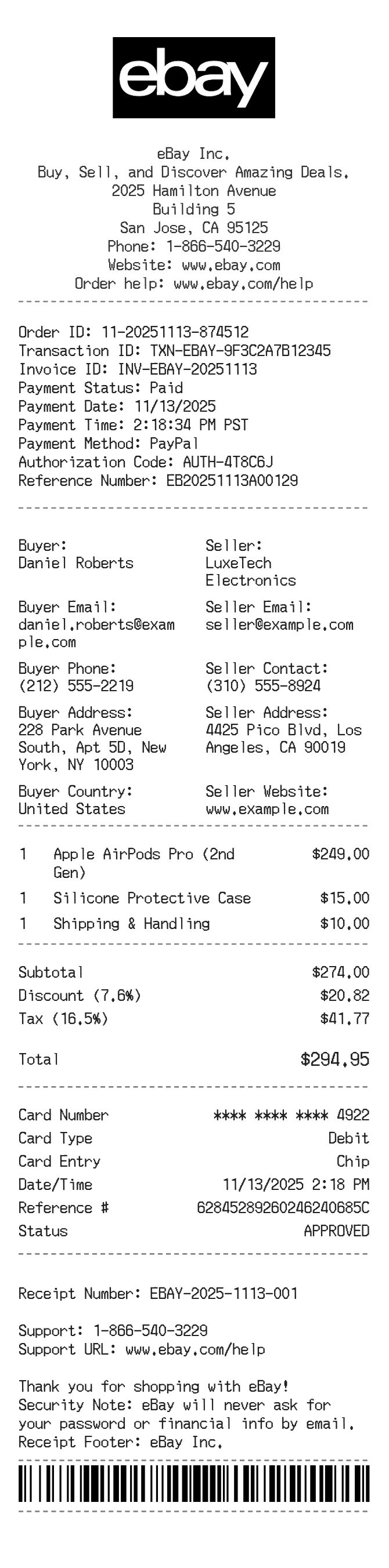
Enter the buyer, seller and order references, then list the products and shipping charge. Check totals and payment notes before downloading.
Last updated
Keep buyer, seller and order information distinct
The eBay template uses separate columns for buyer and seller details. An order message holds transaction, invoice and payment references, while the product list calculates the purchase amounts. Shipping can appear as its own item row, which makes it easier to see how it contributes to the total.
eBay order details as a receipt
eBay doesn't issue a separate receipt; the order details page is the record. It shows the shipping address, the 12-digit order number, tracking and the totals, and each item keeps its own item number. In states where eBay is responsible for collecting sales tax, which now covers every US sales-tax state, the tax is included in the order total at checkout. A seller's Send invoice on eBay is a payment request used to combine items or adjust shipping, not a tax invoice, and can't be sent more than 30 days after the listing ends.
The eBay Money Back Guarantee covers items that don't arrive, aren't as described or aren't accepted back under the seller's own return policy, but only when you paid through eBay checkout. You can report an item not received up to 30 calendar days after the estimated delivery date, and request a return for an item not as described within 30 days of delivery or the seller's return window, whichever is longer.
Finding past eBay orders
Go to Purchase History, find the item and select View order details, then print or save the page from your browser. Purchase History shows the last 60 days by default, and you can pick an earlier year; orders can be hidden but not deleted. Guest checkouts don't appear there, so keep the order confirmation email.
For a business or tax invoice, contact the seller from Purchase History. Tax-exempt buyers can upload exemption certificates through eBay's buyer exemption program.
Marketplace details you can edit
| Section | Details |
|---|---|
| Buyer and seller | Names, contacts, addresses and seller website |
| Order references | Order, transaction and invoice IDs |
| Products | Descriptions, quantities and unit prices |
| Shipping | A separate amount in the item list |
| Payment | Method, date, status and reference notes |
Related receipt guides
Review shipping and payment notes after the products
- Enter the buyer and seller details from your record.
- Update the order and invoice references and describe each product clearly.
- Add the shipping charge once, then check the discount and tax percentages.
- Compare separately written payment details with the final total and save the preview.
FAQs
Official sources
- eBay — Order numbers and order details
- eBay — Purchase history
- eBay — Paying tax on purchases
- eBay — Money Back Guarantee