Xfinity Bill Template
Enter the service period, previous balance, payments and new charges. Review the calculated amount due and payment coupon before downloading.
Last updated
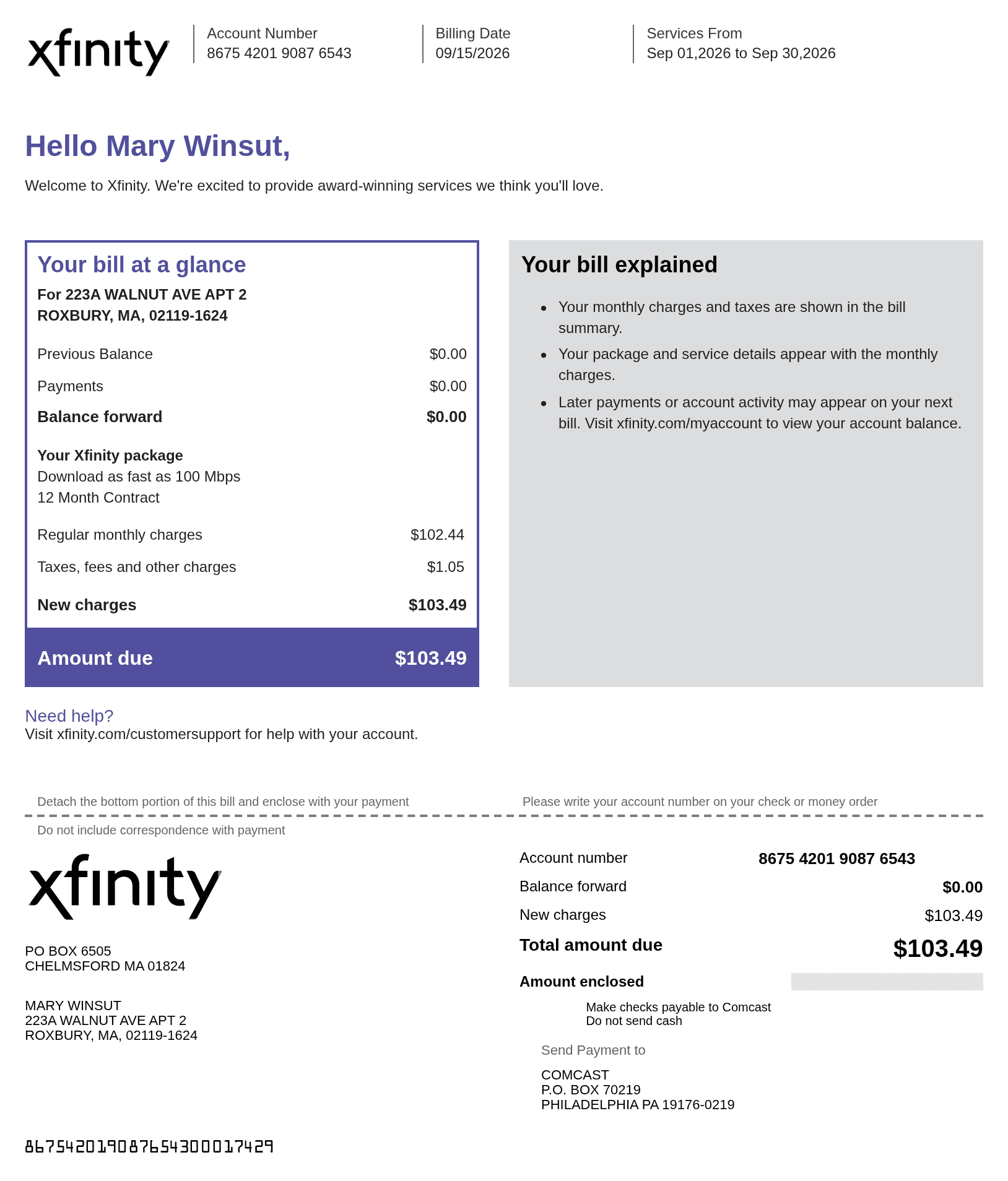
A bill summary with a balance carried forward
The Xfinity layout is a bill with a service address, billing period, account reference and detachable payment section. It calculates the balance forward from the previous balance, payments and any adjustment, then adds the new charges. The amount enclosed remains a separate entry for the payment coupon.
Xfinity payment confirmations and store receipts
When you pay an Xfinity bill online, the confirmation shows a confirmation number and an authorization number, which Xfinity tells you to save and lets you download or print; in the Xfinity app the screen reads Thanks for your payment! and an email confirmation follows. Printed receipts come only from payments made in person at an Xfinity store. The payment record shows what you paid, while taxes and fees are itemized on the monthly bill itself.
Equipment returns have their own proof: an Xfinity Retail Store gives you a receipt with the return details, and for UPS returns the top part of the label with the tracking number is your receipt. Allow up to two weeks for a return to show on your account.
How to find Xfinity payment records
In the Xfinity app, go to Account > Bill details to see transaction history alongside past bills; on the website, open Billing. Only the Primary or Manager user can see billing details, and a new payment can take up to one business day to appear. Up to 24 months of bills can be downloaded as PDFs, even for disconnected service.
How the bill summary is organized
| Section | Details |
|---|---|
| Account | Customer, service address, account number and billing period |
| Balance forward | Previous balance minus payments, plus adjustment |
| New charges | Regular monthly charges plus entered taxes and fees |
| Amount due | Balance forward plus new charges |
| Payment coupon | Due date, account reference and optional amount enclosed |
Related receipt guides
Reconcile balances before changing the payment coupon
- Enter the customer, service period and billing date.
- Review previous balance, payments and any signed adjustment.
- Enter monthly charges and the separate taxes-and-fees amount, then check the calculated amount due.
- Review the payment due date and coupon details before saving the bill.
FAQs
Official sources
- Xfinity help with viewing and downloading billing statements
- Xfinity — Pay your bill online
- Xfinity — View billing history
- Xfinity — Returning your equipment