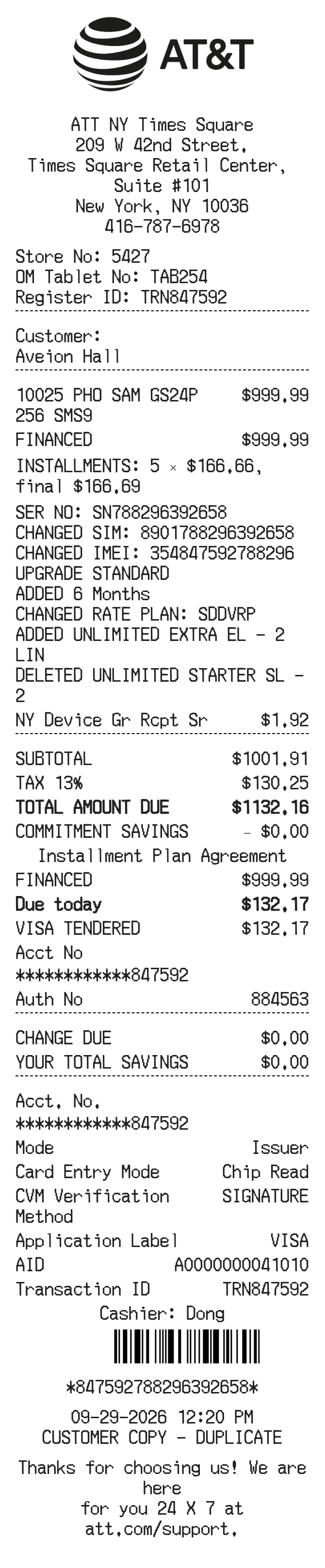
About the AT&T Receipt
AT&T receipts document wireless service payments, device purchases, plan activations, and accessory transactions made in AT&T retail stores or through its online portal. People recreate them to track business expenses, verify installment plan payments, confirm device upgrades, or replace a lost copy needed for warranty claims or insurance reimbursement.
AT&T in Numbers
AT&T traces its roots to Alexander Graham Bell's telephone company founded in 1876. Headquartered in Dallas, Texas, the modern AT&T is one of the largest telecommunications companies in the US, serving tens of millions of wireless subscribers. It operates thousands of retail stores nationwide and offers postpaid, prepaid, and business wireless plans.
What Is On an AT&T Receipt
| Section | Details |
|---|
| Section | Details |
| Store Header | AT&T logo, store address, phone number, store code |
| Transaction Info | Date, time, transaction number, sales representative name or ID |
| Customer Info | Account holder name, wireless number(s) on the account |
| Items / Services | Device name or plan description, SKU or model number, quantity, unit price |
| Installment Agreement | Monthly installment amount, number of payments, remaining balance if applicable |
| Taxes & Fees | State and local taxes, regulatory fees, activation or upgrade fees itemized separately |
| Payment Summary | Subtotal, total taxes and fees, grand total charged |
| Payment Method | Credit/debit card type, last four digits, or cash tendered and change |
AT&T Return Policy Basics
- Devices purchased in-store or online can be returned within 14 days of purchase with the original receipt.
- Returned devices must be in like-new condition with all original contents and packaging.
- A restocking fee may apply to returned devices depending on the purchase type and state regulations.
- Prepaid cards and accessories have limited return eligibility; check the receipt or store policy for specifics.
FAQs
How do I get a duplicate AT&T receipt?
Log in to your AT&T account online or in the myAT&T app, go to billing or order history, and download or print a copy of past transactions. In-store purchases can also be re-printed by visiting the original store with your account information.
What transaction number is used to look up an AT&T receipt?
AT&T receipts print a transaction or order number near the top or bottom of the receipt. You can use this number, along with your account PIN, when contacting AT&T customer support to pull up purchase details.
Does AT&T send email receipts?
Yes. If your email address is on file, AT&T will send a confirmation email for online orders and some in-store purchases. Check your inbox for a message from AT&T at the time of purchase, including any spam or promotions folder.
What information do I need to recreate an AT&T receipt accurately?
You will need the store address and store code, the date and time of purchase, the transaction number, a description of the device or plan purchased, itemized taxes and fees, and the payment method used. All of this is typically visible on the original paper receipt or in your account order history.
Related Templates