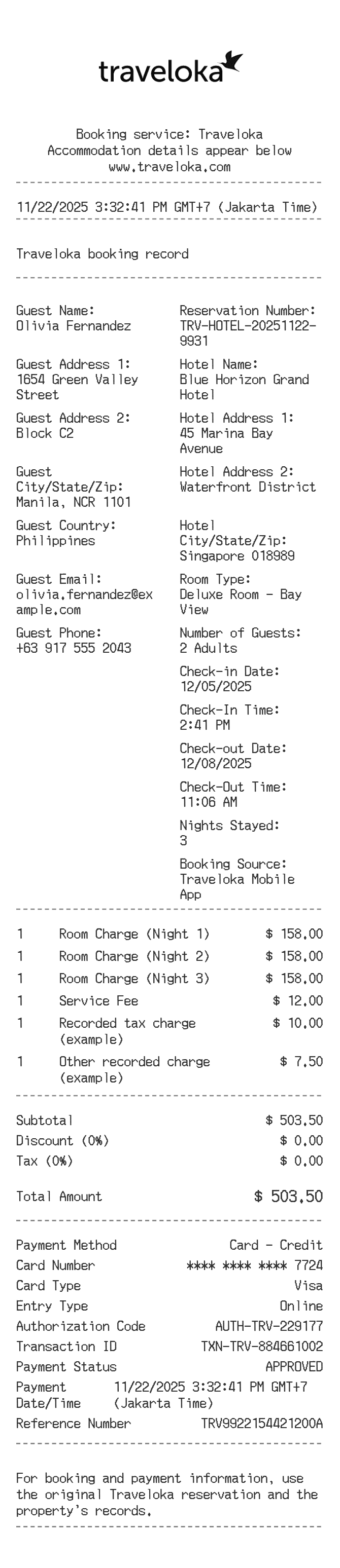
About the Traveloka Receipt
A Traveloka hotel receipt documents a booking made through the Traveloka platform, including the property name, room type, check-in and check-out dates, total charges, and payment confirmation. Travelers commonly need to recreate or reference these receipts for expense reimbursement, corporate travel reporting, or when the original booking confirmation email is lost or incomplete.
Traveloka in Numbers
Traveloka was founded in 2012 and is headquartered in Jakarta, Indonesia. It operates as one of Southeast Asia's largest online travel agencies, serving markets across Indonesia, Thailand, Vietnam, Malaysia, the Philippines, Singapore, and Australia. The platform covers flights, hotels, activities, and lifestyle services for tens of millions of users.
What Is On a Traveloka Hotel Receipt
| Section | Details |
|---|
| Header | Traveloka logo, booking platform name, and receipt title |
| Booking ID | Unique alphanumeric booking reference number |
| Guest Info | Full name of the primary guest on the reservation |
| Property Details | Hotel name, address, star rating, and contact number |
| Stay Details | Check-in date, check-out date, number of nights, and room type |
| Pricing Breakdown | Room rate per night, taxes, service fees, and any applicable discounts |
| Total Charged | Final amount paid, including all fees and taxes |
| Payment Info | Payment method (credit card, virtual account, etc.) and transaction date |
| Footer | Traveloka customer service contact and booking terms reference |
Using a Traveloka Hotel Receipt
- Cancellation and refund eligibility depends on the rate type selected at booking โ non-refundable rates typically do not qualify for any refund.
- Refundable bookings must be cancelled within the window specified on the booking confirmation, and refunds are processed back to the original payment method.
- For expense reporting, the Traveloka app and website allow you to download a PDF receipt or booking invoice from your order history.
- If a receipt is needed for a third-party claim or employer reimbursement, ensure it shows the booking ID, property name, stay dates, and total amount paid.
FAQs
How do I get a receipt or invoice from Traveloka?
Log in to your Traveloka account, go to My Bookings, select the relevant hotel order, and look for the option to download or email the booking invoice. The PDF will include all details needed for expense purposes.
What information does a Traveloka hotel receipt include?
It includes your booking ID, guest name, hotel name and address, room type, check-in and check-out dates, nightly rate, taxes and fees, total amount charged, and the payment method used.
Can I use a Traveloka receipt for corporate expense reimbursement?
Yes. The downloaded invoice from Traveloka contains all the fields most employers require โ booking reference, property details, stay dates, and total cost. Check with your employer whether a VAT or tax invoice is also required, as availability depends on the country.
How do I recreate a Traveloka receipt if I lost the original?
First check your Traveloka app or web account under order history, as past bookings remain accessible. If you cannot retrieve it digitally, use ReceiptEdit's Traveloka template to reconstruct the key booking details for personal reference or record-keeping.
Related Templates