Lyft Receipt Generator with Fare and Tip
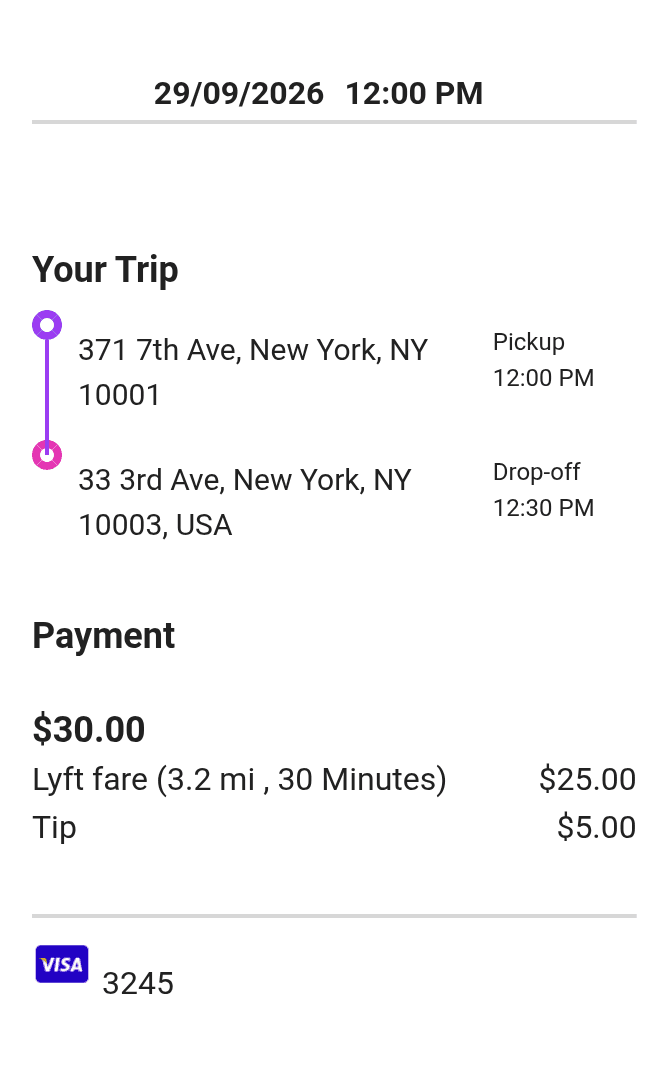
Enter pickup and drop-off addresses, ride times, distance, fare and tip. The payment total updates from the two amounts while the trip details remain editable.
Last updated
Keep the ride fare separate from the tip
The Lyft receipt generator has a simple payment breakdown: fare plus tip. Pickup and drop-off times produce the displayed duration, but neither time nor distance prices the ride. Use the fare from your record, then enter any tip as its own amount.
What a Lyft ride receipt shows
Lyft emails a receipt after each ride is paid, usually within 24 hours. Lyft's pricing help lists the charges that appear on it: the ride fare, a service fee that varies by region, tolls, and third-party fees such as local rideshare taxes, surcharges and airport fees. When you accepted an upfront price, the service fee is included in a single total instead of its own line. Tips are charged separately to your payment method.
For business travel, IRS Publication 463 requires a receipt for any travel expense of $75 or more, and Lyft's emailed receipts or ride reports serve that purpose with a note of the business purpose.
How to get copies of Lyft receipts
Open Ride history in the Lyft app and tap a ride to see its receipt, or use Export to select several rides and have Lyft email a Ride Report with those receipts; history goes back to October 2014. With a business profile, Lyft can forward receipts automatically to expense tools such as SAP Concur, Expensify, Brex, Navan and Ramp.
Ride and payment fields
| Section | Details |
|---|---|
| Route | Edit the starting and ending addresses. |
| Timing | Set the ride date and pickup/drop-off times; the duration follows the times. |
| Distance | Enter the distance and choose its unit. This is a description, not a fare multiplier. |
| Payment | The displayed payment total is fare plus tip. Select the card type and its final digits. |
| Preview | Review the route and payment summary before downloading PDF or PNG. |
Related receipt guides
Check the total once, then the route
- For example, a fare of 25 and a tip of 5 produce a payment total of 30. Enter money amounts, not a tip percentage.
- Check that the distance, addresses and times describe the same journey. Editing an address does not look up a route or fare.
FAQs
Official sources
- Lyft Ride history and receipt exports
- Lyft Help — Emails and receipts
- Lyft Help — Ride history
- Lyft Help — Business profiles