Arby's Receipt Generator
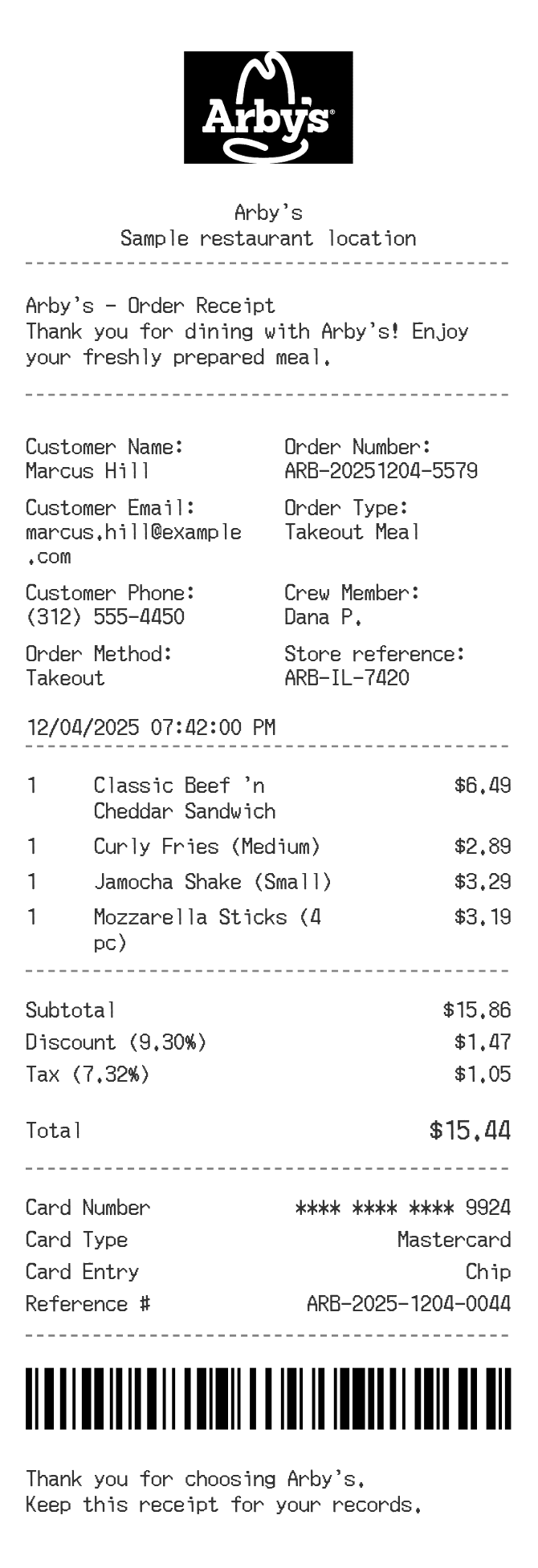
List sandwiches, sides and drinks, then add the order and pickup details. Open each section to edit the receipt and check its total.
Last updated
Group a takeout meal under one order
The Arby's template starts with separate sections for the store, order information and food items. You can keep a meal combination on one line or list its separately priced parts. Customer and crew details sit outside the item table, which keeps long orders easier to scan.
Arby's receipts, prices and Loaded Rewards points
An Arby's receipt reflects the restaurant where you ordered, and Arby's says prices vary across its restaurants, so picking a different location in the app can change your total. Purchases also feed the Arby's Loaded Rewards program, and existing members were automatically upgraded to it on August 24, 2026. Members earn 10 points per $1 spent on qualifying purchases, not counting tax, fees, gratuities or discounts. Only the first two purchases in a day, and the first seven in any 7-day period, earn points. Points expire after one year, and rewards can't be used toward tax or gratuity.
If you buy Arby's for work, the receipt is your documentary evidence. IRS Publication 463 says a restaurant receipt is enough to prove a business meal if it shows the name and location of the restaurant, the number of people served, and the date and amount. Receipts aren't required for expenses under $75 other than lodging, but you still need a record of the expense. You can generally deduct only 50% of unreimbursed meal costs, so note the business purpose on the receipt or in your log.
How to keep a record of an Arby's order
For in-store and drive-thru orders, open My Code in the Arby's app and share the 6-digit code, which is valid for 15 minutes; in-app orders earn points automatically. Points can take up to 72 hours to appear. If a restaurant's system was down and points weren't recorded, Arby's Customer Care can be asked to apply them manually for a qualifying purchase.
Delivery orders placed on Arbys.com or the Arby's app are fulfilled by DoorDash, and the order confirmation email links to its support team. Save that email as your receipt. Deleting your Arby's account permanently removes points, rewards and order history, so save any receipts or confirmation emails you need first.
Build the order from its parts
| Section | Details |
|---|---|
| Header | Replace the sample store heading with the branch details you need. |
| Order information | Edit the order number, service type and customer or crew references. |
| Items | Describe each sandwich, side or drink and enter quantity and unit price. |
| Totals | Review the percentage discount and tax settings before checking payment. |
| Sections | Expand a panel to edit it; move or remove sections that your record does not need. |
Related receipt guides
Choose one way to price each meal
- If a combo has one price, list its included side and drink in the description. Charging those components again on separate rows would duplicate their cost.
- The sample order and prices are examples. They are not a live menu or an order retrieved from an account.
FAQs
Official sources
- Arby's - Contact Us & FAQ
- Arby's - Terms of Use (Loaded Rewards Program), revised October 2026
- IRS - Publication 463, Travel, Gift, and Car Expenses