Tim Hortons Receipt Generator
List coffee, baked goods and other food with their full row charges. Add the store, cashier and till references, then check tax and payment before saving.
Last updated
Describe drinks and bakery items in the order list
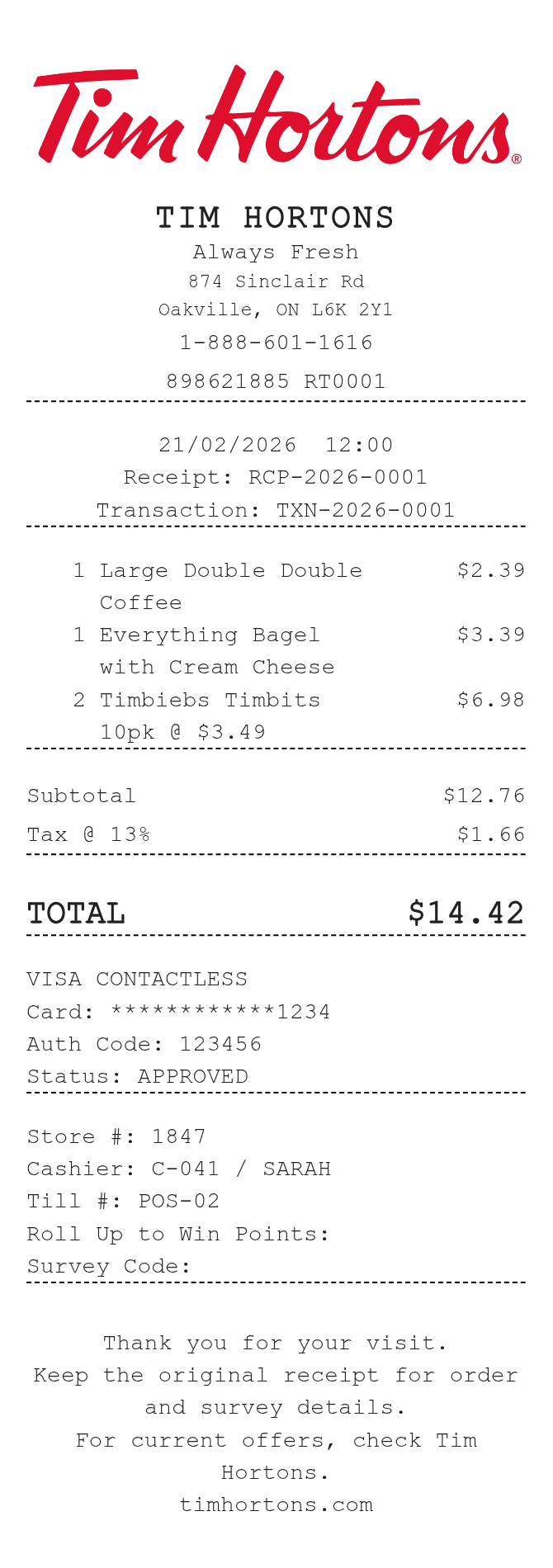
The Tim Hortons sample pairs food and drink rows with Store #, Cashier and Till # fields. Include a drink size or preparation detail in its description. For a box of baked goods, make the pack size clear so the displayed quantity and total charge are easy to understand.
What a Tim Hortons receipt records
Tim Hortons emails a receipt with a breakdown of your order each time you place a mobile order in the app. If you turn on Round Up, the extra amount appears as a separate line called "Tims Camps donation" at checkout and on the receipt. A paper receipt from the counter can also carry a Tell Tims survey invitation; completing the survey gives an offer code to hand to a team member on a later visit. For refunds on a mobile order, Tim Hortons asks you to go to the restaurant where you ordered and show the manager the emailed receipt, and the manager issues the refund through Scan & Pay.
On Canadian receipts, GST/HST depends on what you bought. The CRA's basic groceries memorandum says beverages such as coffee, tea and milk dispensed where they are sold are taxable, and single-serving baked goods such as doughnuts and muffins are taxable when sold in quantities of fewer than six. Food sold at a restaurant is generally taxable. A business claiming input tax credits needs a receipt showing the supplier's name, the date and the total for purchases under $100. From $100 to $499.99, the receipt must also show the GST/HST charged and the supplier's GST/HST registration number.
How to find a past Tim Hortons receipt
For a mobile order, search your email for the receipt sent when you ordered. In the Tim Hortons app, select the Account icon, choose Recent orders, find the order and tap View details for the items and cost.
For purchases paid at the counter with Scan & Pay, open the app, select the Rewards tile on the Home page, go to the History tab and choose Transaction history to see purchases and points earned or redeemed. The same Transaction History tab is available after signing in at timhortons.ca.
Fields in the Tim Hortons sample
| Section | Details |
|---|---|
| Store | Name, address, contact and tax registration reference |
| Checkout | Date, time, store number, cashier and till |
| Items | Description, displayed quantity and complete row amount |
| Payment | Entered tax, total, method and card references |
| Notes | Optional promotion reference, survey code and footer |
Related receipt guides
Check drink sizes and pack quantities
- Replace the store and till references.
- Describe drink sizes and the contents of any box or pack.
- Enter full row charges and review the tax rate manually.
- Check payment and optional promotional text before export.
FAQs
Official sources
- Tim Hortons - Viewing previous mobile orders and receipts
- Tim Hortons - Viewing previous Scan & Pay orders
- Tim Hortons - Requesting a refund on a mobile order
- Tim Hortons - Round Up amount on your order
- CRA - GST/HST Memorandum 4.3, Basic Groceries
- CRA - Input tax credits and required records