Foot Locker Receipt Generator
Add each product’s date, code, quantity and price. Check the cashier, associate, tax and payment details, then review the lower store and message section before downloading.
Last updated
Match the product rows to the checkout references
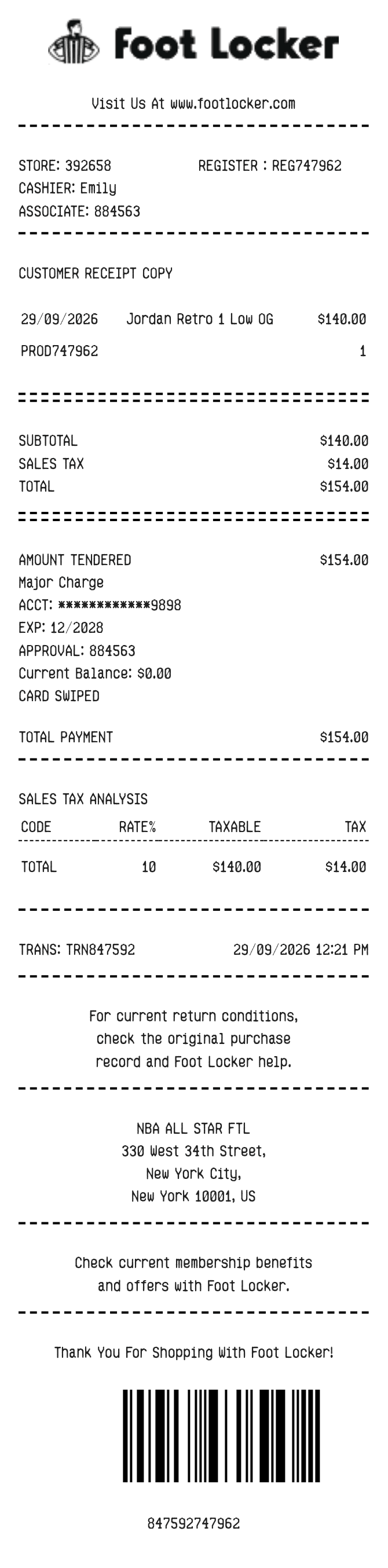
This Foot Locker layout includes a date and product identifier for each item, followed by quantity and price. The receipt header contains store, register, cashier and associate references. Below the total, the payment and tax-analysis blocks repeat figures from the entered sale.
Foot Locker receipts and returns
A Foot Locker receipt lists the store, each item with its style, size and price, discounts, sales tax, total and payment. FLX Rewards members earn points in store by showing their FLX Rewards ID in the app or giving their email or mobile number at checkout, and FLX Cash is applied as a discount. If you forget, Foot Locker gives you 30 days from the purchase date to have the points credited through customer care. Points earned from January 28, 2026 expire 12 months later.
Online and store purchases can be returned within 45 days for credit to the original payment, unworn, in new condition, with original tags and box. With the original receipt you can exchange the item or get a refund to the original payment. An in-store purchase returned by mail must include the receipt or the return won't be accepted, and the refund comes as a check. Return shipping is free for FLX members and $6.99 for others.
Online invoices and sales tax
Every online order sends a confirmation email, and signed-in customers find past orders under My Orders in My Account; guests use the order search page. Footlocker.com purchases can get a price adjustment within 14 days of the order date.
Foot Locker charges sales tax based on the ship-to state where it has a place of business, and refunds include the product cost and tax. Tax-exempt buyers email their documentation and are exempt on future orders once verified.
Fields to check from top to bottom
| Section | Details |
|---|---|
| Checkout | Store number, register, cashier and associate ID |
| Products | Product date, description, ID, quantity and unit price |
| Tax | Entered percentage and calculated tax analysis |
| Payment | Card label, last four digits, expiration and approval code |
| Footer | Store address, editable offer messages and optional barcode |
Related receipt guides
Review item dates as well as the transaction date
- Replace the checkout references and main date.
- Enter the products, checking each row’s date, quantity and unit price.
- Review tax and the payment fields, including expiration and approval details.
- Replace the optional offer messages, inspect the footer and save the receipt.
FAQs
Official sources
- Foot Locker — Return policy
- Foot Locker — Refund policy
- Foot Locker — Earning FLX points
- Foot Locker — Tax rates and guidelines