Gap Receipt Generator
Add the garments, sizes, quantities and prices, then review any promotional adjustment. Check the discount, tax and payment sections before saving the receipt.
Last updated
Review discounts wherever they appear
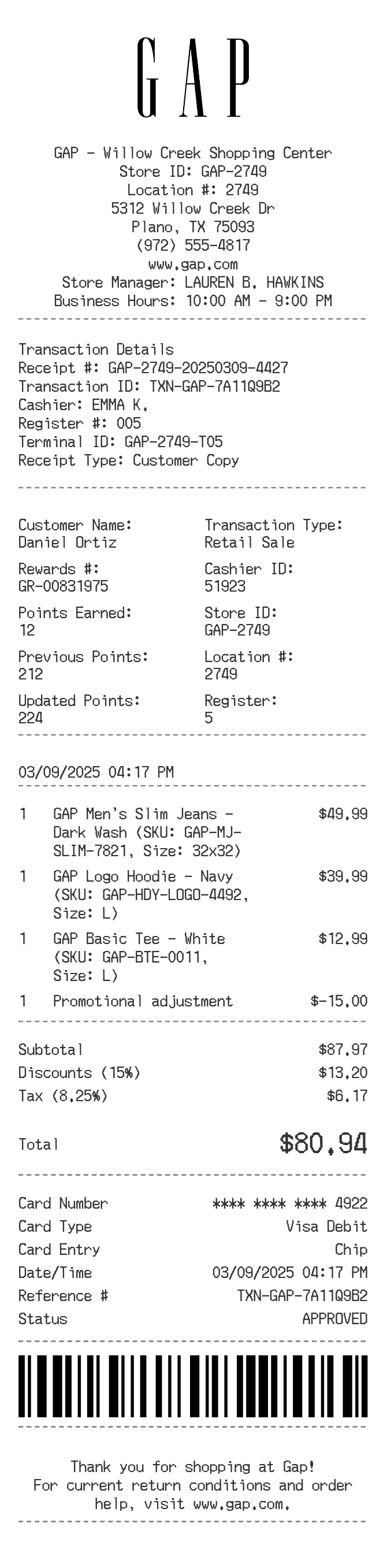
The Gap sample has a negative promotional-adjustment row in the item list and a separate percentage discount in Total Lines. They affect the total independently. When preparing your own record, keep only the adjustments that actually belong so the same saving is not deducted twice.
Gap receipts, returns and Encore rewards
For online orders, Gap's order confirmation email carries the order number, and the shipping confirmation email is what Gap accepts as proof of purchase for online refunds. In February 2026, Gap Inc. replaced Gap Good Rewards with Encore, which earns 5 points per $1 at Gap Inc. brands for Core and Premier members; existing members and points moved over automatically.
Returns with a receipt are accepted within 30 days of purchase, or of delivery for online orders, extended to 45 days for Encore Premier members and 60 days for All-Access cardmembers. Online price adjustments are allowed once within 14 days of the order date, but not in stores.
Returning to Gap without a receipt
For in-store purchases, Gap accepts any one of the receipt, your rewards phone number or the credit card you paid with, which lets the store find the sale. Online orders are listed under Orders & Returns in your account, and guests can look up a single order with the order number and email address.
Product rows and checkout sections
| Section | Details |
|---|---|
| Header | Location, store ID, contact details and business hours |
| Transaction | Receipt number, cashier, register and terminal |
| Items | Garment description with size or SKU, quantity and unit price |
| Totals | Subtotal after item adjustments, percentage discount, tax and total |
| Other notes | Editable customer, rewards and payment entries |
Related receipt guides
Check the promotion before the final amount
- Replace store and transaction examples.
- Enter garments and unit prices; review any negative adjustment row.
- Set or remove the percentage discount, then check tax and total.
- Review customer, rewards and payment notes separately before exporting.