Journeys Receipt Generator
List shoes, clothing and accessories with their quantities and prices. Update the customer and store sections, review the discount, tax and payment, then save.
Last updated
Keep shoes and the rest of the purchase on one record
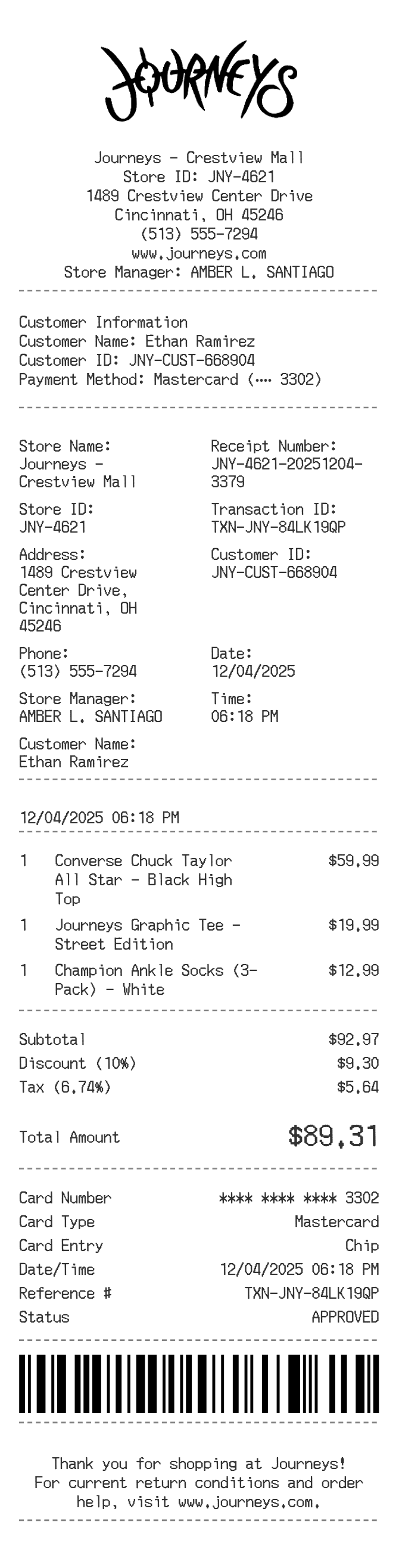
The Journeys sample has a pair of high-top shoes, a tee and a sock pack. Use the description for each product’s model, size and color. The customer-information block and two-column store details can be edited separately from the item list.
How Journeys uses the receipt for returns and rewards
Journeys accepts returns or exchanges within 365 days of purchase on merchandise in new condition, with the original packaging and valid proof of purchase. Its help center names a receipt or an online order confirmation as acceptable proof. Shipping charges are not refunded. In-store returns can go to any Journeys store. Online orders can be mailed back with a prepaid label, and Journeys deducts a $7.99 fee for using that label and asks you to allow 2 to 4 weeks for processing. Store purchases can also be mailed in with the Return/Exchange Form, and Journeys recommends a trackable shipping method.
The Journeys All Access program ties points to the transaction. Its terms give 10 points for every $1 spent on qualifying purchases at participating US stores and on Journeys.com. In a store, you get points by giving the email or phone number on your account at checkout, and they usually post within 24 to 96 hours. No points are earned on sales tax, gift cards, gift wrapping or shipping. Points from an item you return are deducted, so tell the store you are a member when you bring the purchase back. Unredeemed points expire 12 months after they are earned.
Keeping proof of a Journeys purchase
For online orders, keep the order confirmation email. Journeys accepts it as proof of purchase, and Order Tracking on Journeys.com shows the order's status. For store purchases, keep the paper receipt with the shoes and their box, since the return policy asks for both the original packaging and proof of purchase.
If you forgot to give your All Access details at checkout, the program terms let you call Customer Service at (888) 324-6356 within 30 days of the purchase. Once staff verify the purchase and confirm you didn't already get points for it, they may add the points.
Fields across the receipt
| Section | Details |
|---|---|
| Location | Store name, ID, address and manager |
| Customer | Name, customer reference and any payment note |
| Basket | Product description, quantity and unit price |
| Totals | Subtotal, percentage discount, tax and total |
| Payment | Card details, date and transaction reference |
Related receipt guides
Check the purchase details across sections
- Replace the store, customer and transaction examples.
- Enter each product and check whether its price is per item or per pack.
- Review the discount and tax after changing quantities or prices.
- Check the card suffix and date in both customer and payment text, then download.
FAQs
Official sources
- Journeys - Returns and Exchanges
- Journeys - Journeys All Access Terms
- New York State Department of Taxation and Finance - Clothing and Footwear Exemption (TB-ST-122)