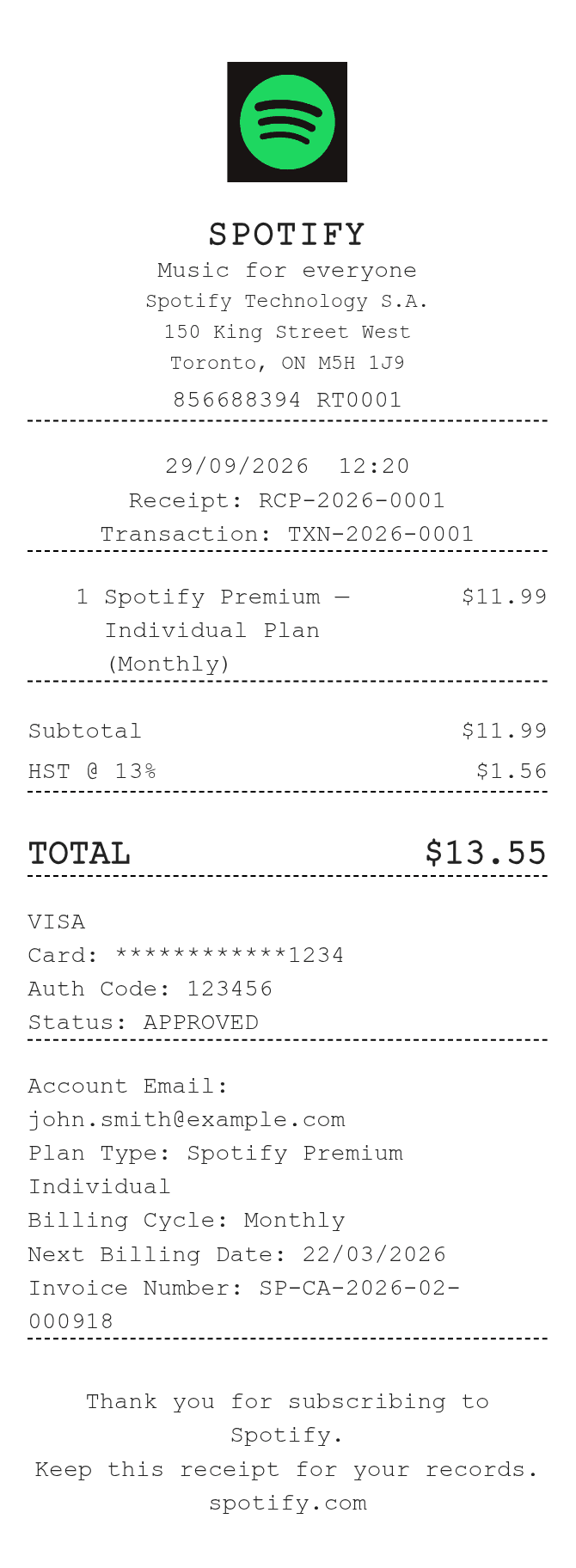
About the Spotify Canada Receipt
A Spotify Canada receipt documents a subscription charge billed to a Canadian account, typically showing the plan tier (Individual, Duo, Family, or Student), the billing period, the amount charged in Canadian dollars, and applicable GST/HST. Users recreate these receipts to submit expense reimbursements, reconcile business accounts, or replace a billing confirmation email that was deleted or never received.
Spotify Canada in Numbers
Spotify launched in Canada in 2014, several years after its 2008 founding in Stockholm, Sweden. It operates in more than 180 countries and serves hundreds of millions of users globally. In Canada, subscriptions are billed in CAD and subject to federal GST and, depending on the province, additional HST or PST.
What Is On a Spotify Canada Receipt
| Section | Details |
|---|
| Header | Spotify logo, 'Invoice' or 'Receipt' label, invoice number |
| Billing date | Date the charge was processed |
| Account info | Account holder name and email address on file |
| Plan description | Subscription tier (e.g., Premium Individual, Premium Family) |
| Billing period | Start and end date of the subscription month covered |
| Subtotal | Base subscription price in Canadian dollars (CAD) |
| Tax | GST/HST amount and rate; varies by province |
| Total charged | Final amount billed including all taxes |
| Payment method | Last four digits of the card or PayPal/payment method used |
Using a Spotify Canada Receipt
- Spotify subscriptions are non-refundable once a billing cycle has processed; cancellation stops future charges only.
- If you were charged in error or after cancellation, contact Spotify Support with the invoice number to request a review.
- Receipts are available in your Spotify account under Account > Subscription > View receipts for up to 12 months.
- For business expense claims, download the PDF invoice directly from your account page; it includes the invoice number, tax breakdown, and registered Spotify entity details.
FAQs
Where can I find my official Spotify Canada invoice?
Log in to your Spotify account at spotify.com, go to Account, then Subscription, and click 'View receipts.' You can download each invoice as a PDF showing the full tax breakdown in CAD.
Why does my Spotify Canada receipt show GST or HST?
Spotify is required to collect Canadian federal GST and, where applicable, harmonized HST on digital services sold to Canadian subscribers. The rate applied depends on your registered province.
What details do I need to recreate a Spotify Canada receipt for expense reimbursement?
You need the invoice date, billing period, plan name, subtotal in CAD, tax rate and amount, total charged, and the last four digits of the payment method. All of this appears on the original invoice from your account page.
Can I get a receipt if I subscribed through the App Store or Google Play?
If your Spotify subscription was billed through Apple or Google, the receipt comes from them, not Spotify. Check your App Store purchase history or Google Play order history for those invoices.
Related Templates