Comcast Payment Receipt Template
List the services and equipment charges, then edit the account, billing period and payment references. Check the item total before saving.
Last updated
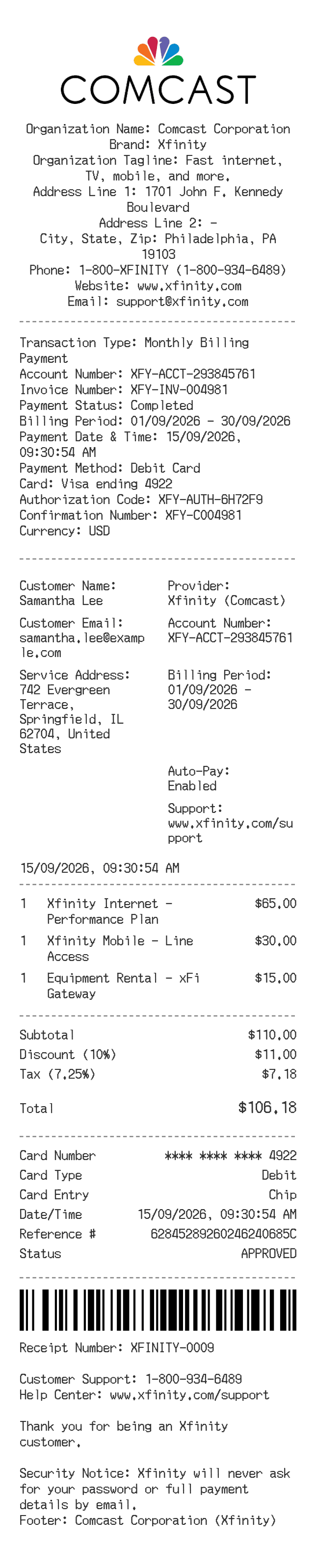
An itemized layout for a Comcast service payment
This Comcast template groups the customer, service address and account references around an itemized list of internet, mobile and equipment charges. It also includes a billing-period message and separate payment details. Use those notes to describe the record; they do not update from a live Comcast account.
What a Comcast Xfinity bill shows
Comcast bills its home services under the Xfinity name, and the monthly statement does most of the work a receipt would. Page 1 shows a Billing Date, the Service From period it covers, and a summary called Your bill at a glance. That summary lists the previous balance, payments since the last bill, regular monthly charges, one-time charges such as installation fees, and taxes, fees and other charges. New charges adds those up for the month, and Amount due adds any unpaid balance. If you changed services mid-cycle, a partial charges section shows the credit or extra charge with its dates.
Page 3 itemizes the services, add-ons, rented equipment such as TV boxes, and every tax and fee. Xfinity says some of these are not taxes at all. The Broadcast TV fee and Regional Sports Network fee are set by Xfinity, and the Federal Universal Service Fund and Regulatory Cost Recovery charges are not government-mandated. Franchise fees, 911 fees and state and local sales or communications taxes are set by government and vary by location. In Illinois, for example, cities may charge up to 5% amusement tax on TV and streaming, and Chicago charges 10.25%.
How to get a copy of a Comcast bill or payment
Sign in to your Xfinity account and open Bill History to download a PDF of any bill from the last 24 months. Xfinity says this works for active and disconnected services. Only Primary and Manager users can view bill details, so other users on the account will not see them. If you are enrolled in paperless billing, you get a text or email when each new bill is ready.
A bill shows what was charged, not always what you paid. After an online payment, Xfinity shows a confirmation you can download or print, and it suggests saving the confirmation and authorization numbers. For business records, the IRS says a supporting document should show the payee, amount, date, description and proof of payment, which may take a bill plus a payment record.
Service charges and account references
| Section | Details |
|---|---|
| Customer | Name, contact details and service address |
| Account | Account number and billing-period entries |
| Charges | Service description, quantity and unit price |
| Summary | Calculated items with percentage discount and tax |
| Payment | Method, status and confirmation references entered separately |
Related receipt guides
Keep the service period consistent
- Replace customer and account details.
- Review every billing-period and payment-date entry in the messages.
- Enter the service and equipment charges, then check discount and tax settings.
- Compare the payment references with the item total and save the finished receipt.
FAQs
Official sources
- Xfinity Support - Understanding your Xfinity bill
- Xfinity Support - Taxes, fees, and other charges on your bill
- Xfinity Support - View your Xfinity bill history online
- Xfinity Support - How to view your Xfinity bill online
- Xfinity Support - How to pay your Xfinity bill online
- IRS - What kind of records should I keep