Check your account, order emails and saved digital receipts first. If a store purchase is missing, ask the store or customer support whether it can retrieve a copy. Do not assume a fixed card-lookup window or permanent account history.
This guide covers Walgreens receipts: how to retrieve in-store and online receipts, how prescription receipts differ, how to use them for FSA reimbursement, and how to recreate a Walgreens-formatted receipt using the Walgreens receipt template.
How to Get Your Walgreens Receipt — 4 Methods
Method 1: Walgreens App (myWalgreens)
- Open the Walgreens app
- Tap your profile or Account
- Tap Purchase History
- Find the order by date or store
- Tap the transaction for full details
The app shows itemized line items, Walgreens Cash rewards earned, coupons used, and tax breakdown. Use the share function to save as PDF.
Method 2: Walgreens.com Online Account
- Sign in at walgreens.com
- Hover your name, then Order Status
- Click the order
- Click Print receipt or save as PDF
Save your own copy of the available order documents. For missing records, ask the retailer what it can retrieve; no lifetime archive is promised.
Method 3: In-Store Lookup
For in-store purchases without myWalgreens:
- Visit any Walgreens store
- Bring the same card used for payment
- Ask the cashier for a transaction lookup
- Ask whether the store can find this purchase using the details you provide
For an unlinked cash purchase, ask the store whether it can locate a record. Keep any paper receipt you still have.
Method 4: Prescription Receipts
Prescription receipts are stored separately:
- Open the Walgreens app
- Tap Pharmacy, then Prescription History
- Tap any prescription
- Select Tax/Insurance Summary for annual reports
Request a prescription expense history from the pharmacy and check that it contains the details your insurer, plan administrator or tax adviser needs. A yearly total alone may not substantiate a particular expense. FSA documentation guide.
What's on a Walgreens Receipt
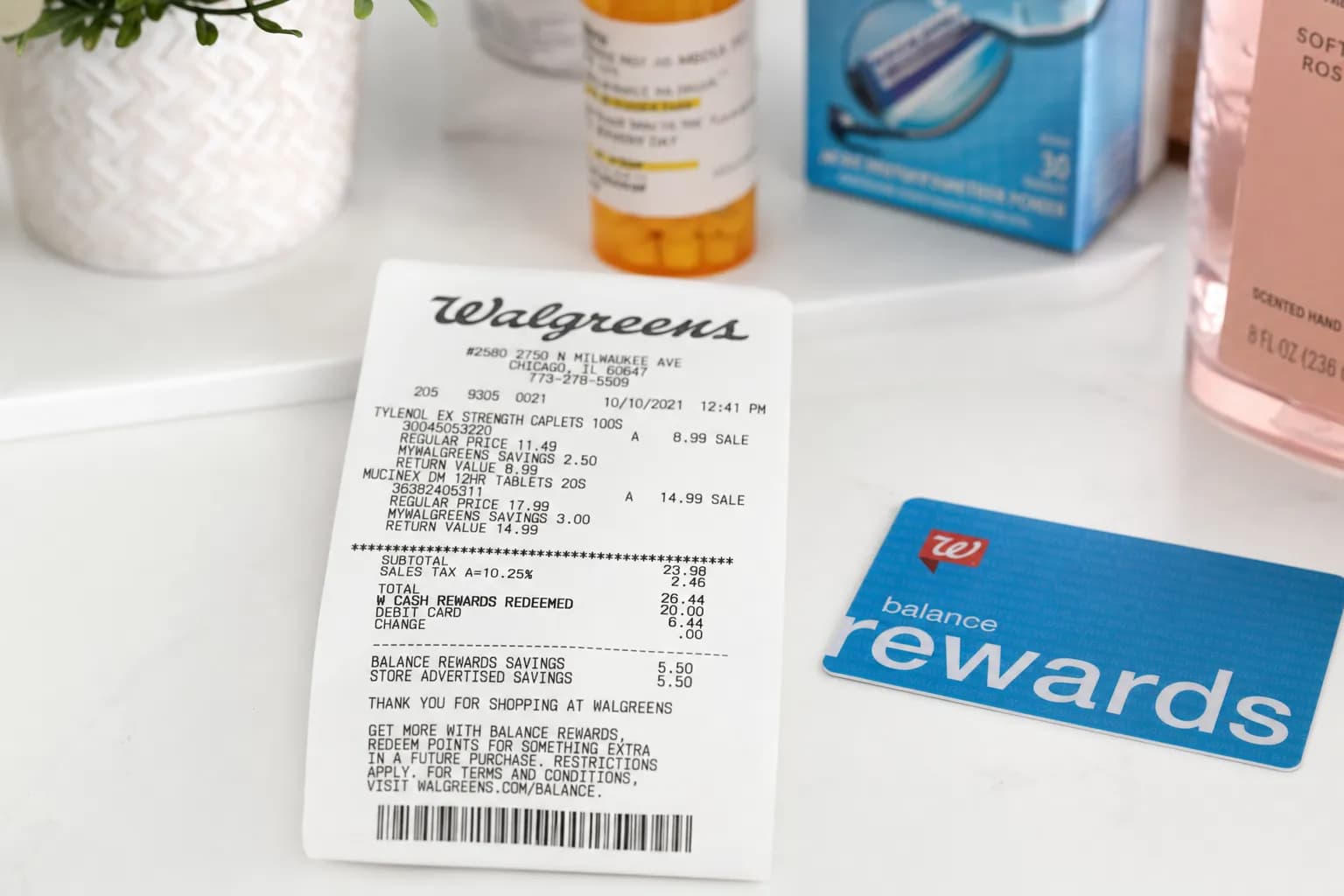
| Field | Details |
|---|---|
| Store header | Walgreens logo, store address, phone, store number |
| Transaction number | Unique transaction ID (RFN# format) |
| Date and time | Of purchase |
| Cashier ID | Operator number |
| Items | Product name, UPC, price |
| FSA tag | "*" or "F" next to FSA-eligible items |
| myWalgreens ID | Last 4 digits of your membership |
| Walgreens Cash | Rewards earned this transaction |
| Coupon savings | Manufacturer + myWalgreens coupons |
| Subtotal / Tax / Total | Pre-tax, tax, final |
| Payment method | Card type and last 4 |
| Survey code | For walgreenslistens.com survey |
Walgreens Receipts and FSA/HSA
Request the merchant-issued itemized record and check the expense and documentation with your plan administrator. A store name or generated layout does not establish eligibility. See our FSA documentation guide.
Walgreens Return Policy at a Glance
- Eligible items: 30 days with the receipt or order number, subject to verification and exclusions. Walgreens returns and receipt help (checked September 11, 2026).
- Without receipt: Store management may approve a Walgreens gift-card credit; it is not guaranteed.
- Cosmetics: Handled at the store manager’s discretion under the linked policy.
- Prescriptions: Use the pharmacy’s separate return and order-error process; contact the dispensing pharmacy.
- Electronics: Handled at the store manager’s discretion under the linked policy.
Walgreens Receipt Template
If you need to recreate a Walgreens-style receipt, the Walgreens receipt template on ReceiptEdit includes:
- Walgreens standard header layout
- Transaction RFN# and store number
- Itemized lines with FSA tags
- myWalgreens savings breakdown
- Subtotal, tax, total
- Payment method (last 4)
- PDF or PNG download
For the CVS equivalent, see our CVS receipt guide. For broader expense tracking, see itemized receipts.
FAQs About Walgreens Receipts
How do I get my Walgreens receipt online?
Sign in at Walgreens.com, open Purchases → Purchase History, select the order number and use the Print or PDF icon. These steps are in Walgreens receipt help (checked September 11, 2026).
Can Walgreens look up an old receipt without myWalgreens?
For a missing store receipt, ask the selling store whether it can locate your transaction. If you have an online order, check its confirmation email and available account record. Walgreens' published return and receipt guidance does not guarantee lookup for every purchase without a loyalty account.
How long does Walgreens keep receipt records?
Save your own complete copies; do not assume account history will remain available indefinitely. For an older or missing transaction, ask the retailer what records it can retrieve. Prescription records are separate from retail receipts; ask the pharmacy about access to the dates you need.
Are Walgreens receipts accepted for FSA reimbursement?
Request the merchant-issued itemized record and check the expense and documentation with your plan administrator. A store name or generated layout does not establish eligibility. See our FSA documentation guide.
How do I print a Walgreens receipt at home?
Open the Walgreens app, find the purchase in Account → Purchase History, tap Share, then Print or Save as PDF. For walgreens.com orders, the Print receipt option on the order detail page produces a clean printable version.
What's the difference between a Walgreens and CVS receipt?
Walgreens and CVS receipts can show item details and loyalty activity, but neither account should be treated as a permanent archive. See our CVS receipt guide for its receipt options.
Does Walgreens email receipts?
Yes, if you opt in. At checkout, ask for a digital receipt — Walgreens emails it to the address on your myWalgreens account. You can also enable email receipts as the default in the app under Account settings.
How do I get a Walgreens prescription receipt for taxes?
Request a prescription expense history from the pharmacy and check that it contains the details your insurer, plan administrator or tax adviser needs. A yearly total alone may not substantiate a particular expense. FSA documentation guide.