Check your Chipotle order emails, app and saved paper receipts. If a purchase is missing, ask the restaurant or Chipotle support about a copy; account linkage does not guarantee permanent access.
This guide covers Chipotle receipts: how to find them across the app and email, how to use them for Chipotle Rewards points retroactively, expense reports, and how to recreate a Chipotle-style receipt using the Chipotle receipt template.
How to Get Your Chipotle Receipt — 3 Methods
Method 1: Chipotle App Order History
Look for available order records in your Chipotle account:
- Open the Chipotle app
- Tap the profile icon
- Tap Order History
- Find the order by date
- Tap to view full receipt
The app shows the full order, customizations, price, tax, and tip. Use the share icon to export as PDF or send via email.
Method 2: Chipotle.com Account
- Sign in at chipotle.com
- Click your profile
- Click Order History
- Click the order
- Print or save as PDF
Save your own copy of an order record while available; account history is not a guaranteed lifetime archive.
Method 3: Email Order Confirmation
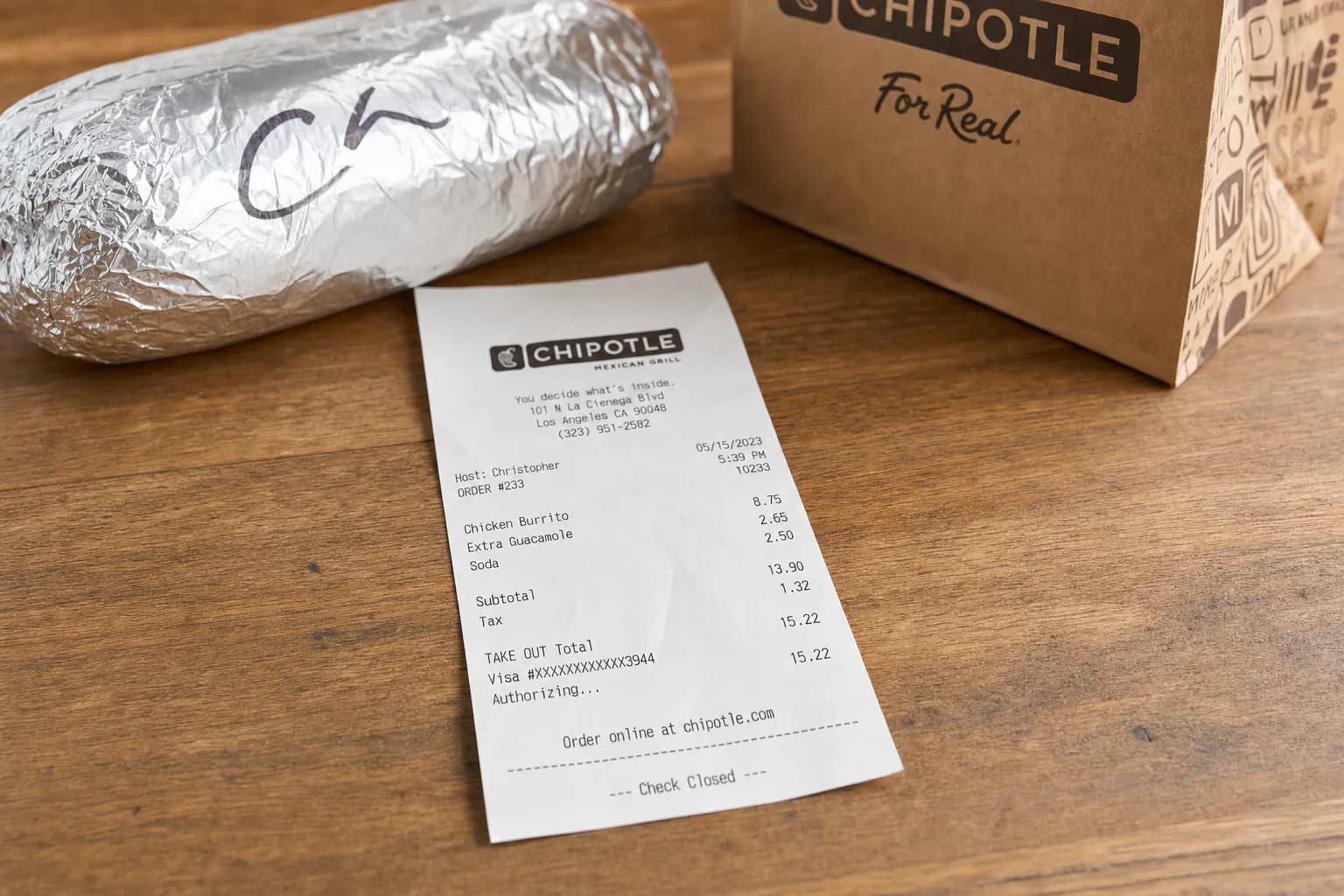
For every app or online order, Chipotle sends an immediate confirmation to the email on your account. Search your inbox for "Chipotle" or "orders@mailer.chipotle.com" to find any historical order. The email IS your receipt — it includes order number, items, customizations, and total.
What's on a Chipotle Receipt
| Field | Details |
|---|---|
| Restaurant header | Chipotle logo, location address, phone |
| Order number | Unique transaction ID |
| Date and time | Of order |
| Order type | In-Store, Pickup, Delivery |
| Items | Entrée (Burrito, Bowl, Tacos, Salad), customizations |
| Add-ons | Guac, queso, chips, drinks |
| Subtotal | Pre-tax |
| Tax | Local sales tax |
| Tip (delivery) | Driver gratuity |
| Total | Final amount |
| Payment method | Card type, last 4 |
| Rewards points earned | 10 points per $1 spent |
Chipotle Rewards Points and Receipts
Chipotle may award missing points at its discretion with a valid receipt. Its terms exclude purchases before enrollment or more than 30 days before the request, and apply frequency limits. Chipotle Rewards terms (checked September 11, 2026).
Chipotle Return / Refund Policy
- Order issues: Contact Chipotle support promptly with the order details.
- Missing items: Ask support to review the order and explain the available remedy; a refund or credit is not automatic.
- Quality complaints: handled case-by-case via customer service
- Delivery issues: file via DoorDash/Uber Eats if ordered through them
Chipotle Receipt Template
If you need to recreate a Chipotle-style receipt (lost original, expense report, etc.), the Chipotle receipt template on ReceiptEdit includes:
- Chipotle standard header layout
- Order number field
- Itemized entrées with customizations
- Subtotal, tax, tip, total
- Payment method (last 4)
- PDF or PNG download
For other restaurant receipts, browse our restaurant templates. For business meal expense reports, see expense report receipts.
FAQs About Chipotle Receipts
How do I get my Chipotle receipt?
Look in your account’s order history and search your email for the order confirmation. Ask Chipotle about a record you cannot find; neither permanent history nor recovery of every transaction is guaranteed.
Does Chipotle email receipts?
Yes, for every app and online order. The confirmation email from orders@mailer.chipotle.com IS your receipt and includes order number, items, customizations, and total. For in-store orders, you can ask for a digital receipt at checkout if you have a Chipotle Rewards account linked.
Can I get points retroactively from a Chipotle receipt?
Missing points can be considered under the Chipotle Rewards terms. Keep the valid receipt and submit the request promptly; the terms set a 30-day limit and other restrictions, without promising automatic credit.
How long does Chipotle keep order history?
Save your own complete copies; do not assume account history will remain available indefinitely. For an older or missing transaction, ask the retailer what records it can retrieve.
Can I use a Chipotle receipt for an expense report?
Keep the original itemized order record and payment evidence, and add the business purpose and attendees where required. Your employer decides which expense documents it accepts. See our expense report receipt guide.
How do I print a Chipotle receipt?
Open the Chipotle app, find the order in Order History, tap Share, then Print or Save as PDF. The email confirmation can also be printed directly from your email client.
Are Chipotle receipts itemized?
Check the actual receipt for item details, customizations and charges. An itemized record can support an expense, but its format does not by itself satisfy every tax requirement. IRS receipt requirements guide.
What if my Chipotle order has a missing item?
Report the missing item promptly through Chipotle support with your order details. For a purchase placed through another delivery platform, follow that platform’s support process. The remedy depends on the case.