7-Eleven Receipt Generator
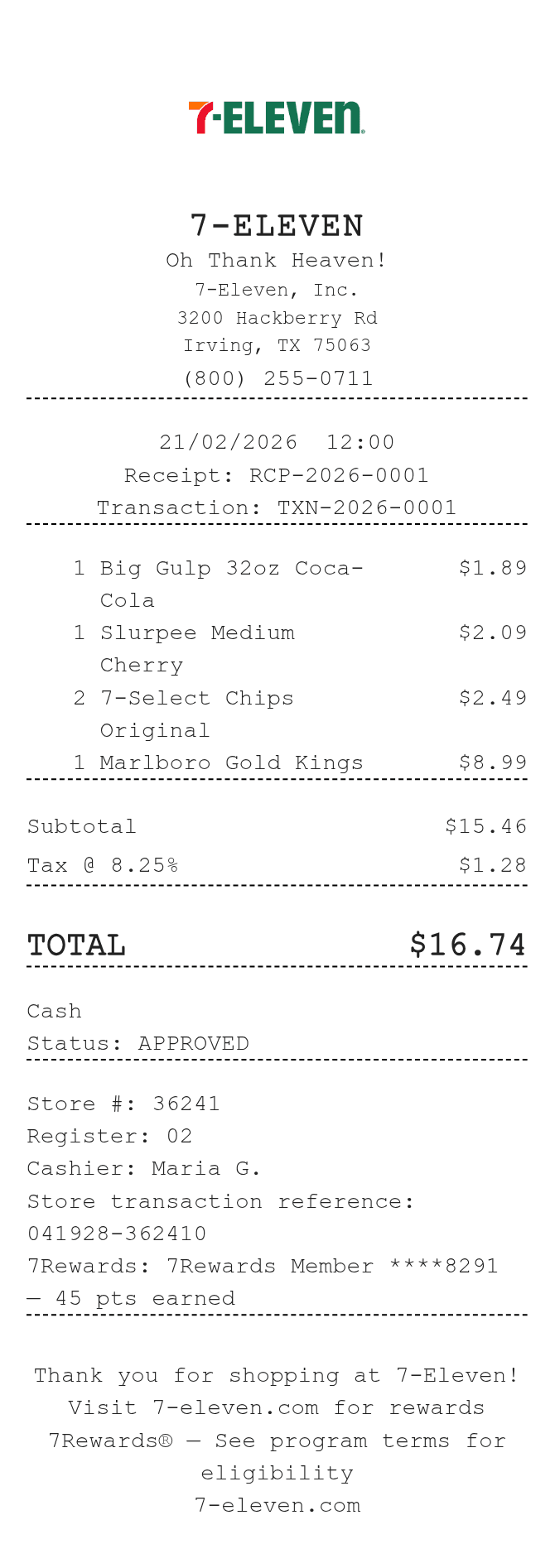
Edit the store details, purchases and payment information. Check your 7-Eleven receipt in the preview, then download a PDF or PNG.
Last updated
Make a 7-Eleven receipt with the details you need
This layout has space for convenience-store purchases, a store number, register and cashier. You can also include a transaction reference and a 7Rewards note. Start with the example in the editor and replace its details, or clear it to enter your own. ReceiptEdit is an independent template editor; it does not connect to 7-Eleven purchase records.
What a 7-Eleven receipt records
At a 7-Eleven counter the receipt is your main record, and 7-Eleven's terms put the job of keeping it on you. When you pay with a 7-Eleven Gift Card or the 7-Eleven Wallet at a participating store, you can request a receipt that names the card or Wallet as the payment method and shows the remaining prepaid balance. 7-Eleven does not mail account statements for either one. Billing errors on a card or Wallet must be reported within 60 days of the transaction for 7-Eleven to review them.
Mobile Checkout in the 7-Eleven App produces a physical or electronic receipt. The terms say store associates may compare the products you carry with that receipt or the proof of purchase on your phone and ask for items to be rescanned. If an item won't scan, ask an associate to make sure it appears on your receipt. Registered 7Rewards members earn points through Mobile Checkout in the app, but purchases made through the mobile checkout web page don't earn points. For 7NOW delivery orders, 7-Eleven collects applicable sales tax, including tax on delivery and other fees.
How to find a 7-Eleven purchase record
Wallet purchases appear in the transaction history inside the 7-Eleven App. For a Gift Card, you can ask for a balance receipt at a participating store or call Customer Support at 1-866-520-4842. 7NOW orders are listed under Past Orders in the 7NOW App, which is also where refund requests for orders without Merchant Products begin.
7-Eleven's terms don't describe a way to reprint an ordinary in-store receipt, so keep the original whenever you may need it for a refund, warranty or expense report. Paying with the 7-Eleven Wallet also earns 3X 7Rewards points, according to the 7REWARDS page.
What you can change
| Section | Details |
|---|---|
| Store | Name, tagline, address, phone, logo, store number and register |
| Transaction | Date, time, cashier, receipt number and transaction references |
| Purchases | Item descriptions, quantities and the complete amount for each row |
| Payment | Card, Cash or Other / custom, plus a payment-status note |
| Extra details | A manually entered 7Rewards note, footer message and optional barcode |
Related receipt guides
From the example to your download
- Replace the store address, date and transaction references. The details shown when the editor opens are examples.
- Add your purchases and enter each row's full charge in Line amount. Set Tax % if you need it; the editor applies that percentage to the whole subtotal.
- Choose a payment method and review the rewards and footer text. These notes stay as you enter them when you change the item rows.
- Check the receipt through to the bottom. Use the arrow beside Download Receipt to choose a paper size or PNG, then save the file.
FAQs
Official sources
- 7-Eleven's official 7Rewards information
- 7Rewards program terms and exclusions
- 7-Eleven - Terms & Conditions (7NOW, Mobile Checkout, Gift Card, Wallet), updated October 12, 2026
- 7-Eleven - 7REWARDS