H&M Receipt Generator
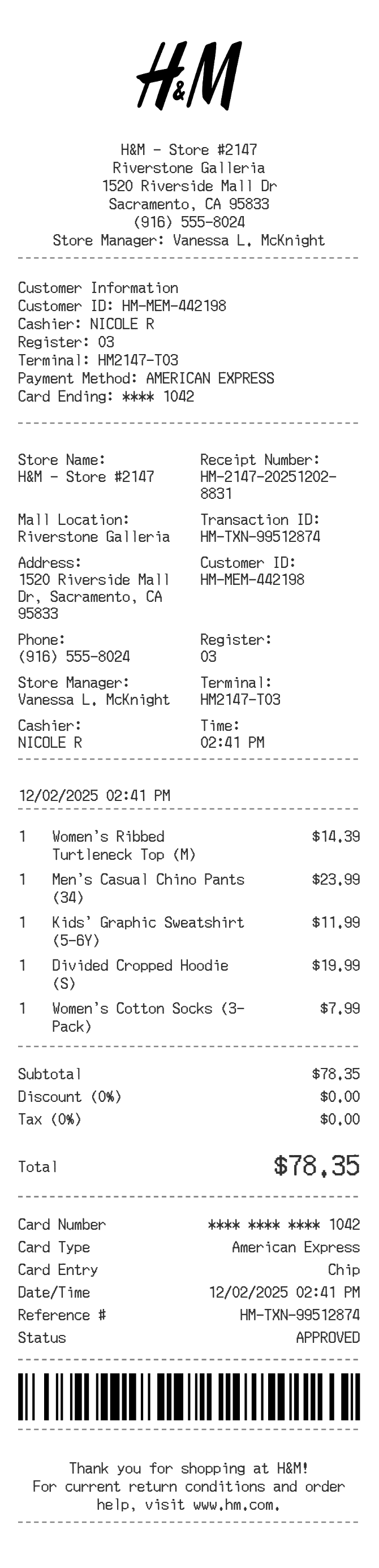
Describe the clothing, sizes and quantities, then review prices, discounts and tax. Update the store, customer and payment sections before saving.
Last updated
Make sizes clear across a mixed clothing basket
The H&M sample includes adult and children’s clothing plus a sock multipack. Each description can carry the size or article reference, with quantity and unit price alongside it. A customer-information section and two-column checkout details can be edited without changing the basket.
What H&M expects from your receipt at the register
H&M's US policy is short and strict: merchandise cannot be exchanged or returned without a valid receipt. Store purchases can be refunded or exchanged within 30 days of the purchase date, and the original payment method must be present at the return. Items must be unworn, unwashed and undamaged, with all labels and tags attached. Returns must be made in store by the customer, and H&M says it may refuse excessive returns, with or without a receipt. Returns are not accepted after 30 days.
Some purchases can't come back even with an H&M receipt. Hosiery, underwear other than bras, swimwear without the hygienic seal, opened cosmetics, earrings, face masks, gift cards and red-sticker sale items are final sale, and all Pre-Loved purchases are final too. Items bought with a discount code or during a sitewide promotion follow the normal policy unless marked Final Sale. A gift receipt, or a purchase paid with an H&M gift card, is refunded as merchandise credit.
Finding a digital copy of an H&M receipt
H&M members can find receipts and order confirmations under My account in the H&M app or on hm.com. H&M says digital receipts from store and online purchases appear there within 45 minutes, so scan your member ID in the app at checkout. Membership is free, but you must be 16 to join.
For an online order returned in a store, bring the e-receipt attached to your shipping confirmation email within 30 days of delivery. Free In-store Pickup orders can only be returned in stores, never by mail.
Information in the receipt sections
| Section | Details |
|---|---|
| Store | Name, store number, mall location and contact details |
| Checkout | Cashier, register, terminal and receipt references |
| Items | Description with size, quantity and price per unit |
| Total lines | Subtotal, discount percentage, tax percentage and total |
| Payment | Card details, date, reference and entered status |
Related receipt guides
Review the zero-value examples before exporting
- Replace the sample store and checkout information.
- Enter garments and pack quantities, keeping sizes in the descriptions.
- Set the discount and tax percentages for your record; the starting zeros are placeholders.
- Check the payment details wherever they appear, then download.