GRIDSERVE EV Charging Receipt Template
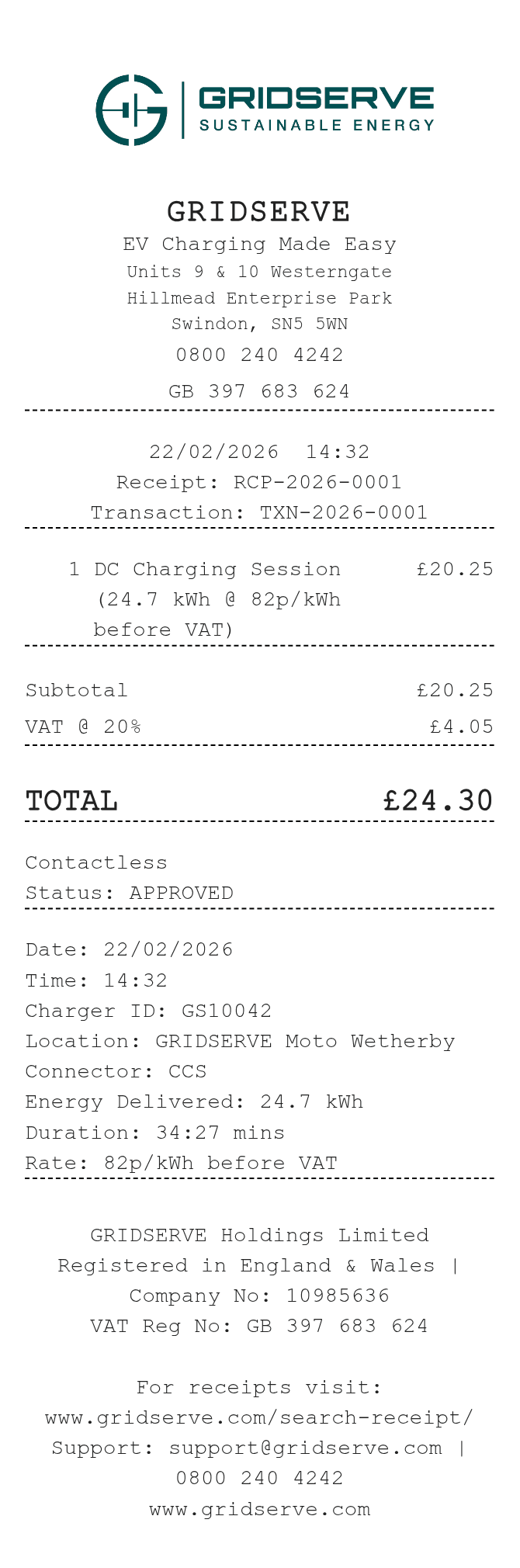
Add the charger ID and location, session date, energy and duration. Review the charging amount, VAT and payment note before saving the receipt.
Last updated
Identify the charger as well as the site
A site can have several charging units. This GRIDSERVE layout provides a Charger ID and Charging Location so those details stay together, followed by connector, energy, duration and rate notes. A separate session date and time can be entered alongside the receipt’s main date.
Prices, holds and VAT on a GRIDSERVE charging receipt
GRIDSERVE charges for the energy you receive, per kWh, rather than for charging speed. As of November 2026, its pricing page lists DC charging at 85p to 92p per kWh depending on location, whether you pay in the app or by contactless, and 59p per kWh on standalone AC chargers of up to 22kW. GRIDSERVE Plus members pay £7.99 a month for 25% off. The site price is shown on the charger itself. HMRC treats electricity supplied through a publicly accessible charging point as standard-rated, whatever the quantity, so public charging carries the 20% standard rate rather than the 5% rate on home energy.
Your bank may briefly show a hold that differs from the final cost. GRIDSERVE takes a pre-authorization, a temporary hold released once charging is completed: £30 when you pay in the app and £10 for contactless payments. Use the receipt total, not the hold, for expenses. If you are VAT-registered and reclaim VAT, HMRC lets a retailer issue a simplified VAT invoice for supplies of £250 or less including VAT. It shows the seller's name, address and VAT number, the tax point, a description, the total including VAT and the VAT rate. Above £250, a full or modified VAT invoice is required on request.
How to find a GRIDSERVE charging receipt
For contactless sessions, the GRIDSERVE receipt portal finds a receipt from the last four digits of the card, the charging location and the date, and knowing the session cost helps confirm it. If you paid with Apple Pay, Google Pay or Samsung Pay, use the last four digits of the virtual account or card number shown in your wallet app's card details. Receipts should appear about three hours after the session.
If a receipt doesn't appear, contact GRIDSERVE customer service by live chat or web form with the card or digital account number, location, time and date, and cost. Sessions paid in the GRIDSERVE app show in its charging history, where you can store and share receipts for expenses.
Details to compare with your charging record
| Section | Details |
|---|---|
| Equipment | Charger ID, location and connector type |
| Timing | Session date, time and charging duration |
| Energy | Delivered kWh and a separately entered rate note |
| Bill | Complete charge rows, subtotal, VAT and total |
| References | Receipt number, transaction number and payment details |
Related receipt guides
Check dates and amounts together
- Set the receipt date and the separate session date and time.
- Enter the charger, location, connector and delivered energy.
- Review the rate note and enter the complete line charge before VAT.
- Check the payment details and total, then download the finished layout.
FAQs
Sources and references
- GRIDSERVE receipt lookup and contactless guidance
- GRIDSERVE - EV charging receipt search and FAQs
- GRIDSERVE - Network pricing and pre-authorization
- GRIDSERVE app listing - App Store
- HMRC - VAT on fuel and power (Notice 701/19)
- HMRC - Record keeping for VAT (Notice 700/21)
- GOV.UK - VAT rates