Dillard’s Receipt Template
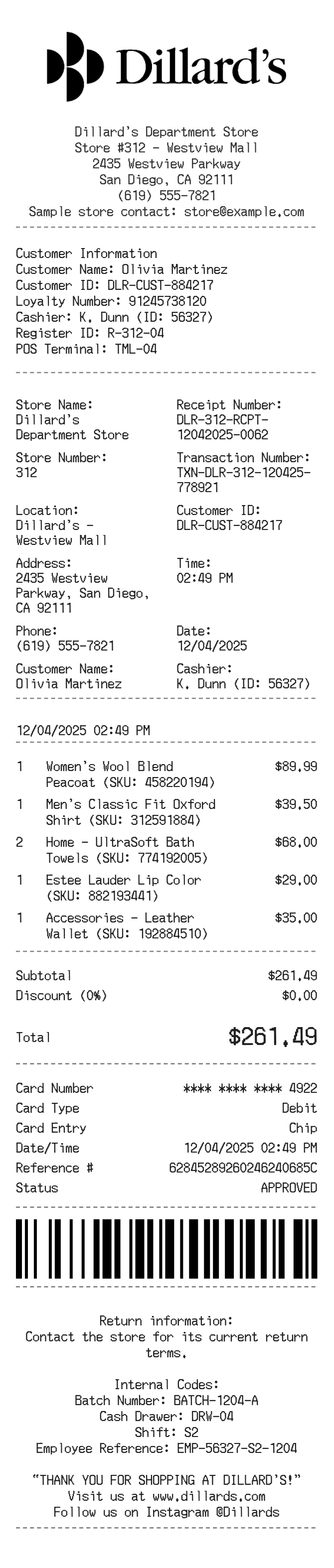
Add department-store purchases with product codes, sizes or shades. Review the customer information and item totals, then download your edited layout.
Last updated
Product codes help distinguish similar purchases
This Dillard’s template has room for clothing, homewares, accessories and beauty products in the same item list. Descriptions can include SKUs and variants, while the surrounding sections hold customer, cashier and checkout references. Quantities multiply unit prices, and you can add the applicable discount and tax settings in the item section.
What matters on a Dillard's receipt
Dillard's tracks every sale with a proof of purchase, or POP, label. In stores the yellow label is physically attached to the item, and the POP number also appears on the receipt. For a store return, Dillard's lists four conditions: no more than 30 calendar days since purchase unless the face of the receipt or a point-of-sale notice gives a longer period, original unused condition unless there is a manufacturer's defect, the original proof of purchase label, and all merchandise tags still attached. Items must also come back in original packaging, and clearance centers do not take returns.
Refunds go back in the form and amount of the original tender, including sales tax, or as a Dillard's merchandise credit, at the customer's choice. Check purchases have a 10-day wait before a cash or check refund. Afterpay purchases come back as a Dillard's gift card or a credit to the Afterpay account. Dillard's does not issue price adjustments. Clearance items marked down 65% or more, sale items with an additional discount, and personalized merchandise cannot be returned or exchanged unless damaged, defective or shipped in error. A holiday return period extends the window into January for eligible purchases made from November 1.
Finding your Dillard's receipt and POP numbers
For Dillards.com orders, POP information is in the Order Status email sent when items ship, or the email sent when an order is ready for pickup and picked up in store or curbside. The same details appear on the Order Detail screen under Order History on Dillards.com and in the Dillard's mobile app, where you can also look up an in-store or online purchase and click Start Return.
The store purchase return form asks for a POP number for each item. If you no longer have your Dillard's receipt, use the POP numbers on the yellow stickers you received with each item. Returns by mail with the Dillard's label cost $9.95, while in-store returns are free.
The sections to check
| Section | Details |
|---|---|
| Item list | Description, SKU text, quantity and unit price |
| Variants | Clothing size, product color or beauty shade |
| Customer | Name, customer ID and optional loyalty note |
| Checkout | Receipt number, store, register and cashier |
| Footer | Editable store notes and internal references |
Related receipt guides
Match the codes to the right fields
- Update the store header and customer information.
- Put each SKU with its product description, including the variant when needed.
- Check quantities, unit prices, discount and tax values.
- Review the receipt references and payment section before exporting. A printed code does not query the retailer’s system.
FAQs
Official sources
- Dillard’s information about store purchases and returns
- Dillard's - Returns
- Dillard's - Store purchase returns