Mister Car Wash Receipt Template
Edit the wash package, additional services and payment record in a Mister Car Wash layout. Check the visit details in the preview and download PDF or PNG.
Last updated
Record one wash visit clearly
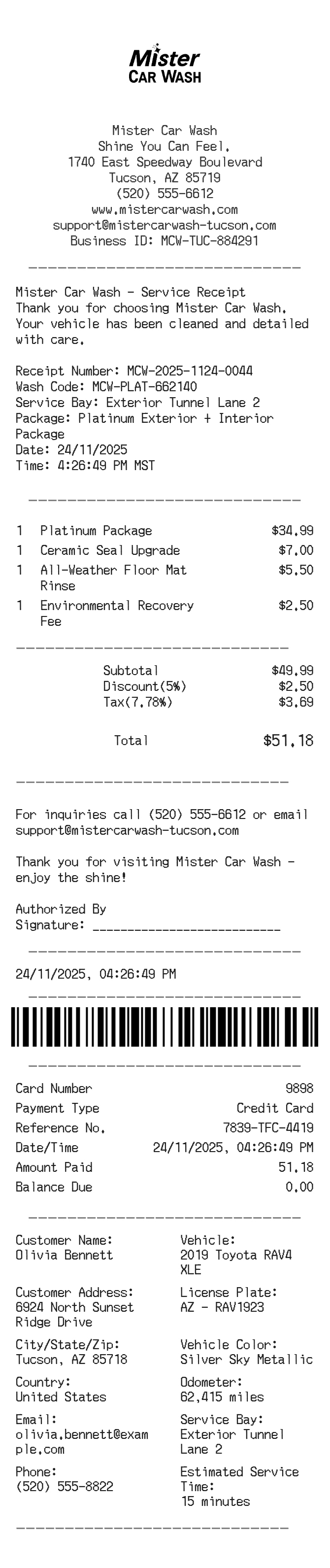
The example separates the package from additional services and places the wash code, service bay and visit information in a message section. Customer and vehicle details use editable two-column rows. You can shorten or rearrange these sections when a simpler record is enough.
Mister Car Wash receipts, memberships and invoices
Mister Car Wash records depend on how you pay. Unlimited Wash Club members are billed monthly, and the membership terms say the plan number appears on the purchase receipt, which also links to the terms. The plan renews automatically until canceled, and you must cancel at least 7 days before renewal to avoid the next monthly charge. The vehicle keeps wash access until the end of the paid period. Paid membership fees are nonrefundable, with no credit for part of a month, and upgrades or extras bought at the wash are charged to the card on file.
Prepaid single washes bought online arrive as a one-time QR code or barcode by email or text, or in your Mister account. Mister says these passes don't expire, are nonrefundable, and are priced by the city and state entered at purchase, with applicable taxes charged to your payment method. Business customers are handled differently. Fleet Accounts get a monthly itemized PDF invoice listing the date, time and location of each wash and the barcode sticker numbers that were served, on Net 30 terms.
How to get a copy of a Mister Car Wash receipt
Ask for a receipt at the time of service if you need one. Mister's Business Accounts help page says it can't reprint a receipt later, although fleet washes still appear on the monthly invoice. For memberships, create an online account or use the Mister Car Wash app and link your membership with the member pass number and the last 4 digits of the card on file. The account lets you check membership status, update payment details and view transaction history.
Membership changes, payment updates and cancellations made online each trigger a confirmation email, which is worth saving as your record of the change alongside the original purchase receipt.
Parts of the layout
| Section | Details |
|---|---|
| Wash visit | Package, wash code, service bay and date/time text |
| Charges | Package and separately paid upgrades or services |
| Vehicle information | Labels and values you can edit or remove |
| Payment | Cash/card fields and transaction references |
| Footer | Custom message and contact text |
Related receipt guides
Review the package and payment
- Replace example service names and prices with the visit details you intend to record.
- List an upgrade as a separate charge only if it is not already part of the package.
- Check the discount and tax percentages in the item section, then compare the total with any amount written in the payment section.
- Review manually repeated dates, package names and references before saving.
FAQs
Official sources
- Mister Car Wash Business Accounts help
- Mister Car Wash - Unlimited Wash Club Membership Plan Terms
- Mister Car Wash - Online Single Wash Terms and Conditions
- Mister Car Wash Help Center - Business Accounts
- Mister Car Wash Help Center - Account Management
- Mister Car Wash Help Center - Unlimited Wash Club