Airbnb Receipt Template for Nightly Rates and Fees
Enter the guest, host and stay details. Use the number of nights and a nightly price for accommodation, then list cleaning and service charges separately.
Last updated
Match the nights to the accommodation charge
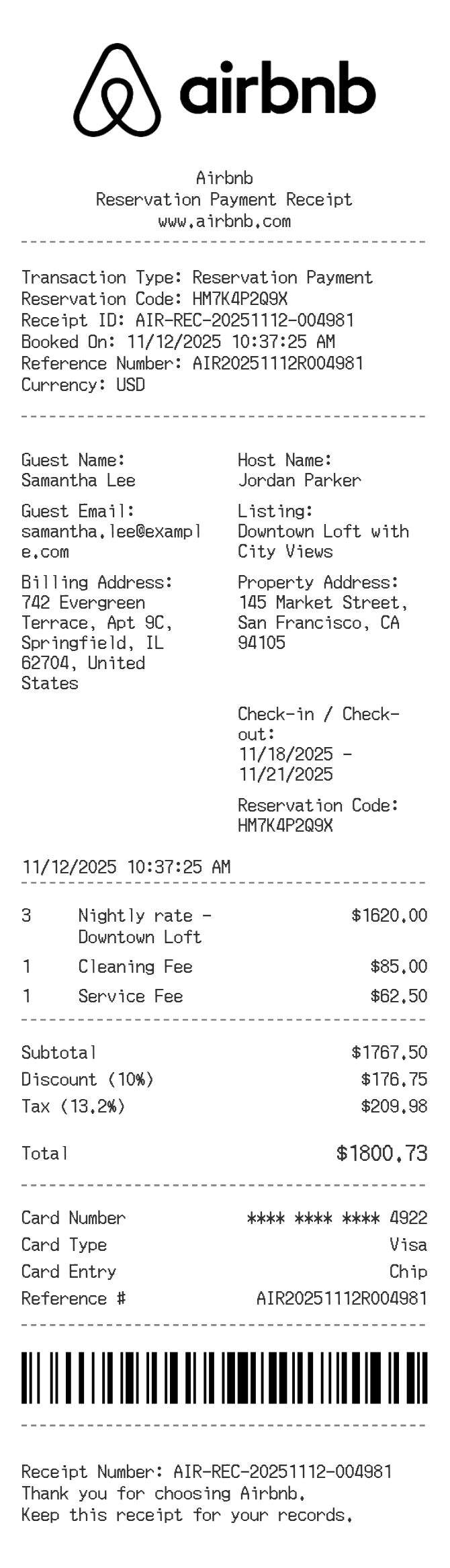
This Airbnb receipt template groups the guest and property details beside a reservation reference. The item table multiplies quantity by unit price, so a nightly rate needs the number of nights as quantity. Check-in and check-out dates are editable text; they do not calculate the stay length.
How Airbnb receipts work after you pay
Airbnb issues a billing receipt when a guest pays for a reservation, and its help center says that receipt is final and can't be changed. It stays in the currency you paid in and in the language set in your account when it was created. If a trip change alters the price, such as adding guests or moving dates, a new receipt is issued once you pay the difference or receive a refund. Changes with no price impact do not create one. Adding guest names or business travel details after paying also leaves the existing receipt as it was, and payments made through the Resolution Center get their own emailed receipt.
The price breakdown separates the stay from fees. Under the split-fee structure, guests pay a service fee of 14.1% to 16.5% of the booking subtotal, shown before booking and charged when the booking is confirmed. Where VAT applies, the fee shown already includes it. In areas listed in Airbnb's tax collection article, including several US states, Canada and Australia, Airbnb calculates occupancy taxes, VAT or GST at booking, collects them from the guest and remits them for the host. Elsewhere, hosts handle other tax obligations and may add local taxes to a listing where the law allows.
Getting an Airbnb receipt or VAT invoice for expenses
For a completed stay on desktop, open Trips, choose the reservation under Past trips, select Your stay, then click Get receipt under Payment info. You can download, print or email the Airbnb receipt from your profile, including in the app. When VAT is charged on Airbnb service fees, the emailed receipt links to a VAT invoice under the service fee line. That invoice shows the name and address in your account and can't be modified after it is issued.
For US business travel, IRS Publication 463 says lodging always needs documentary evidence, even when the cost is under $75. Its example of an adequate hotel receipt shows the name and location, the dates you stayed and separate amounts for each type of charge, so check your stay record covers the same points.
Build the stay breakdown
| Section | Details |
|---|---|
| Guest | Add the guest name, email and billing details in the two-column section. |
| Property | Record the host, listing, property address and check-in/check-out dates. |
| Accommodation | Enter nights as quantity and the cost of one night as unit price. |
| Extra charges | Use a separate row for a cleaning or service charge; quantity 1 applies it once. |
| Total | A percentage discount reduces the subtotal before the percentage tax is added. |
Related receipt guides
Keep the reservation notes consistent
- If a stay is 3 nights at 180 each, the accommodation row totals 540. Entering 540 as the unit price would charge that amount for every night.
- Review the reservation code wherever it appears, then inspect the payment section and downloaded PDF or PNG.
FAQs
Official sources
- Airbnb: finding receipts from past trips
- Airbnb - Finding receipts from past trips
- Airbnb - Managing your reservation receipt
- Airbnb - Airbnb service fees
- Airbnb - Areas where tax collection and remittance by Airbnb is available
- Airbnb - Locating your VAT invoice
- IRS - Publication 463, Travel, Gift, and Car Expenses