Parking Receipt Generator
Add the parking name, address and date, then enter the base price and tax amount. The preview adds those amounts to show the total.
Last updated
A parking receipt with a separate tax amount
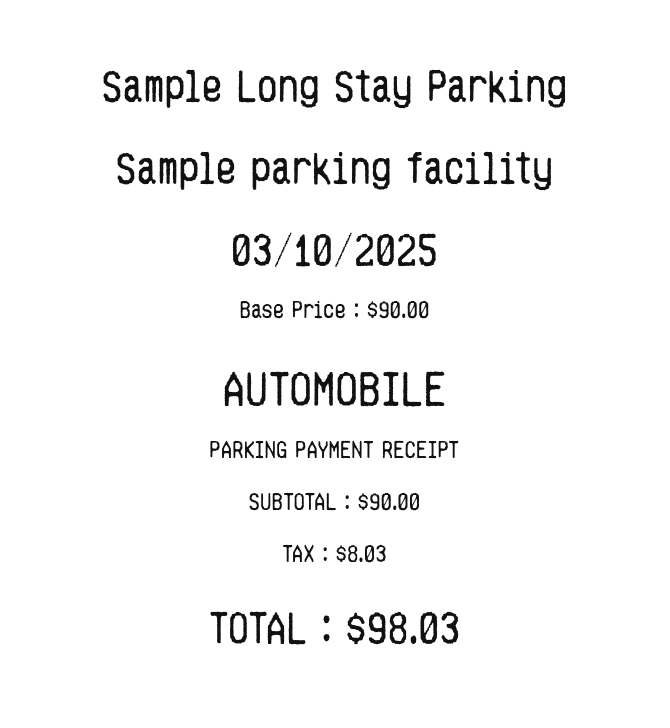
This compact parking layout has two money fields: Base price and Tax amount. The total adds them together. It also provides an editable vehicle heading and captions for the receipt and totals. Use it when you need a dated parking payment record without entry and exit times or an item list.
What a parking receipt shows
Parking receipts depend on how you paid. A PayByPhone session lists the location name, vehicle, vendor, start and expiry times and total amount, with each start or extension shown with its payment method the way it appears on your card statement. ParkMobile enforcement checks your license plate and zone number, plus the space number where used, so the app or email confirmation stands in for a dashboard ticket. A SpotHero Parking Pass shows the exact start and end times, any in-and-out privileges and the vehicle information.
Tax lines matter on parking receipts. Illinois says its parking excise tax should be stated as a separate item from the price on the receipt, or a sign or invoice must say tax is included. The state rate is 6% for hourly, daily and weekly parking and 9% for monthly or annual parking. Chicago adds its own 23.25% city parking tax on daily, weekly and monthly parking and valet. San Francisco charges 25% on off-street parking charges.
Getting a copy of a parking receipt
In PayByPhone, open Account, then History & receipts, pick a session and download the PDF; you can email up to 10 sessions as PDF or CSV, but guest receipts can't be retrieved later. ParkMobile sends confirmations by email, SMS or push and keeps recent sessions under Activity, then History. SpotHero puts the Parking Pass in the booking email and your account, and Business Profiles can forward receipts to expense tools.
For business travel, IRS Publication 463 treats parking at your regular workplace as a nondeductible commuting expense, while parking when visiting a client or customer is deductible, even alongside the standard mileage rate. Receipts aren't required under $75 or when one isn't readily available, such as at a meter, but you still need a written record.
A simple amount breakdown
| Section | Details |
|---|---|
| Location | Parking name and multiline address |
| Date | Entered receipt date |
| Amounts | Base price plus a separate tax amount |
| Text | Vehicle, receipt and total captions |
Related receipt guides
Prepare the payment summary
- Enter the correct facility and date.
- Set the base price before tax.
- Enter tax as a money amount, or zero when appropriate.
- Check the total and captions before saving.
FAQs
Official sources
- PayByPhone — Parking receipts
- ParkMobile — Do I need to display a receipt?
- SpotHero — FAQ
- City of Chicago — Parking Tax
- Illinois DOR — Parking Excise Tax FAQ
- SF Treasurer — Parking Tax
- IRS — Publication 463