UPS Shipping Receipt Generator
Arrange the shipper, receiver and shipment sections, then itemize shipping and packaging charges. Check discounts, tax and the preview before downloading.
Last updated
Arrange a shipping receipt around the transaction
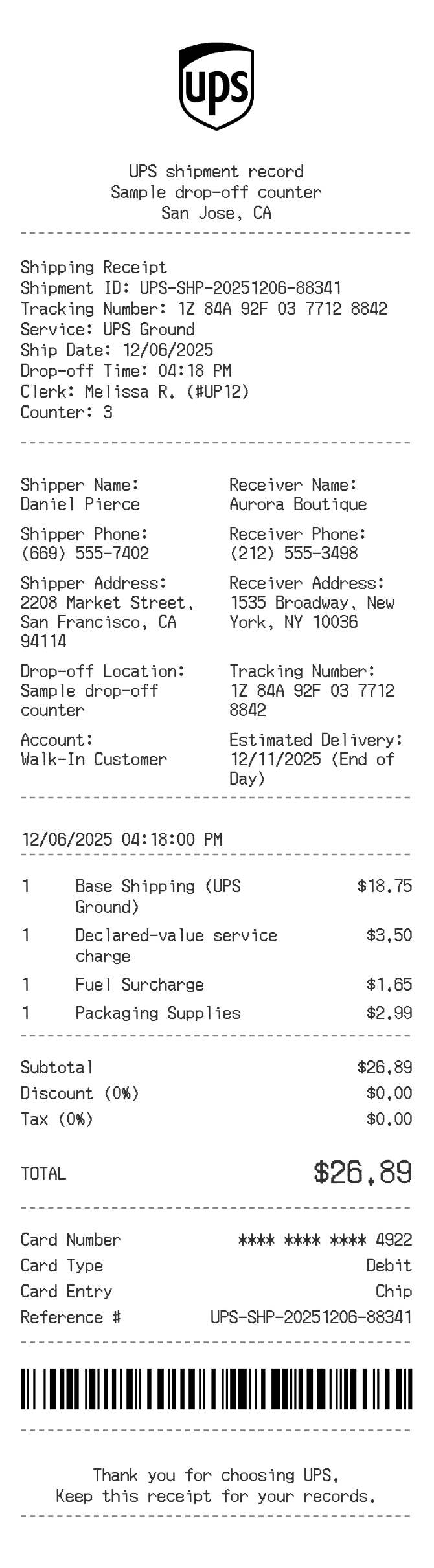
The UPS editor uses movable sections for business details, shipment notes, two-column information, item charges, payment and barcode. Labels and values in the two-column section can hold the route or customer references you need. The item list calculates quantity times unit price, then applies the entered percentage discount and tax.
How UPS receipts support claims
UPS asks you to start a claim within 60 days of the scheduled delivery for a lost or damaged package, or when a collect on delivery (C.O.D.) payment wasn't received. You need the tracking number, and UPS says to keep any invoice that shows the package's value and, for damage, the contents and packaging. Every claim needs supporting documentation, such as an invoice showing the value of the merchandise. Serial numbers are required for some items, including electronics over $500. Damage claims need three photos: the item and how it was packed, a close-up of the shipping label with the tracking number, which generally starts with 1Z, and the outside of the box. Since July 31, 2022, paperwork is uploaded through the Claims Dashboard, not sent by fax or mail.
If The UPS Store packed your item, its Pack & Ship Guarantee can apply. It covers loss or damage in transit when a participating location packs the item with new materials bought there and ships it via UPS on the store's own account. Reimbursement covers the item's value up to the declared amount, limited to the lesser of actual value, replacement cost or repair cost, plus the price paid for packing materials and services and the shipping cost, excluding Declared Value charges. If you didn't declare the item's value and buy Declared Value for that amount, the most you can recover for the item is $100. Shipments made on UPS.com or your own UPS account, and customer-packed boxes, are excluded.
How to get a UPS receipt or invoice copy
If you paid for a label on UPS.com while logged in to your account, the shipment is saved in your Shipping History; find it in the list and use its menu to retrieve your receipt. Account holders enrolled in the UPS Billing Center can see invoices for 56 weeks after they are issued. Without Billing Center, UPS lists 1-800-811-1648 for duplicate domestic and export invoices.
For a package shipped at The UPS Store, have the tracking number and your receipt or other proof of value ready, keep any damaged items and all packing materials, and contact the store where you shipped it if you need help with the claim.
Sections available in the editor
| Section | Details |
|---|---|
| Header | Business details and optional logo |
| Shipment | Editable notes, labels and values |
| Charges | Quantity and unit price for each service |
| Adjustments | Percentage discount and tax |
| Output | Payment references, barcode and footer |
Related receipt guides
Match the sections to your shipment
- Replace the business, shipper and receiver information.
- Check that repeated tracking references agree.
- Enter shipping and packing charges with their quantities.
- Review adjustments and payment details before export.
FAQs
Official sources
- UPS - File a claim
- UPS - Supporting documents for claims
- UPS - Billing, invoices and receipts
- The UPS Store - Pack & Ship Guarantee
- The UPS Store - Customer service and claims