Adidas Receipt Generator
Enter product IDs, descriptions and purchase amounts. Review the store, membership reference and tax summary, then download the receipt.
Last updated
Pair each product identifier with its amount
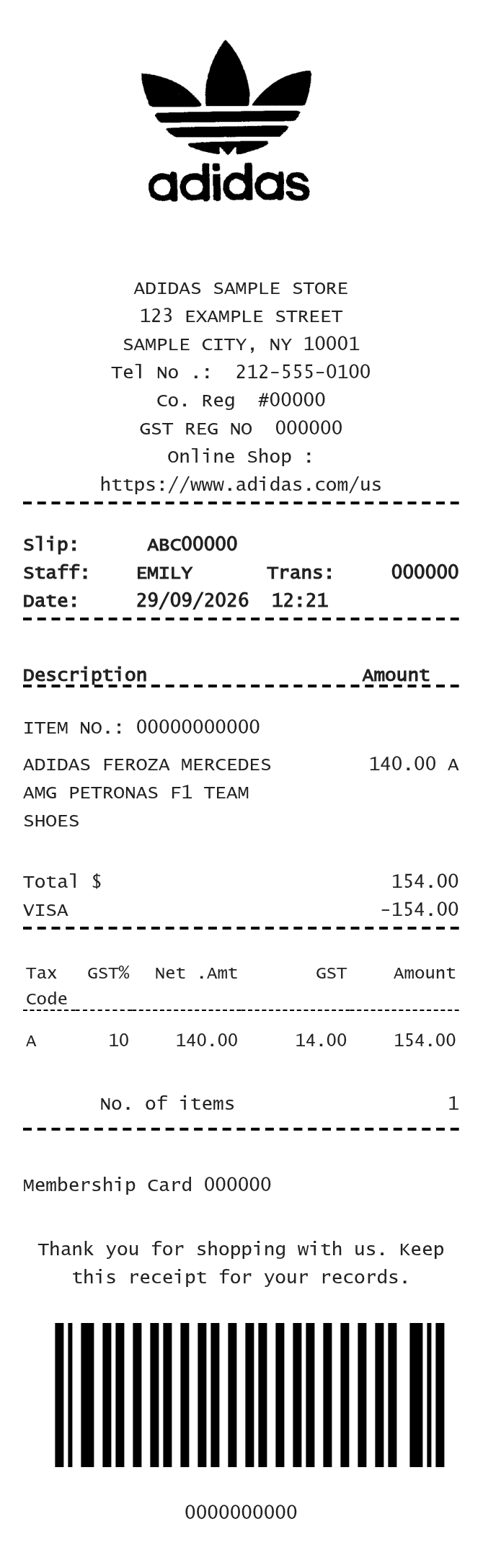
This Adidas layout places an item number above each product description and shows its amount with a tax-code letter. The header includes slip, registration and cashier references. A tax summary and membership-card entry follow the item list, making the store and checkout references easy to compare.
adidas receipts and invoices
For adidas.com orders you get an order confirmation email when you buy and a shipment confirmation listing the order number, a tracking link and every item shipped, which serves as the itemized invoice. Online order numbers begin with AD. Your card is charged when the first shipment leaves the warehouse, including sales tax where applicable. Signed-in members find orders under Order History, while guest checkouts don't appear there and are found with the order tracker.
Most online orders can be returned within 30 days of delivery, with shorter windows of 7 or 14 days for some Hype products, and eligible holiday orders from October 29, 2026 to January 11, 2027 get 60 days. Store purchases go back to the store within 30 days, or 14 days for limited items. adidas says online purchases cannot be returned in stores, and franchise stores, identified on the receipt, set their own policies.
Warranty claims need the receipt
The adidas warranty covers manufacturing defects within 6 months of purchase with valid proof of purchase. adidas accepts a screenshot, image or scan of the original store receipt or itemized online invoice showing the item, purchase date and store, plus the code and manufacturing date from the product label. Store purchases are handled by the store, and adidas doesn't do repairs.
adiClub members are identified in store by showing the adiClub Pass in the app or giving their email or adiClub ID at checkout.
Product rows and checkout details
| Section | Details |
|---|---|
| Items | Product ID, description, full amount and displayed tax code |
| Store | Name, address, telephone and website |
| Checkout | Slip, registration, cashier and transaction references |
| Tax summary | Entered percentage, net amount, tax and total |
| Membership | An independently entered card reference |
Related receipt guides
Check product rows before the tax summary
- Replace the sample store and checkout details.
- Add each product identifier, description and complete row amount.
- Review the tax percentage, payment method and membership reference.
- Check the closing message and optional barcode, then download the preview as PDF or PNG.
FAQs
Official sources
- adidas US — Return policy
- adidas US — Returning a store purchase
- adidas US — Warranty
- adidas US — Invoice copy
- adidas US — Order history