AXE Body Wash Receipt Template
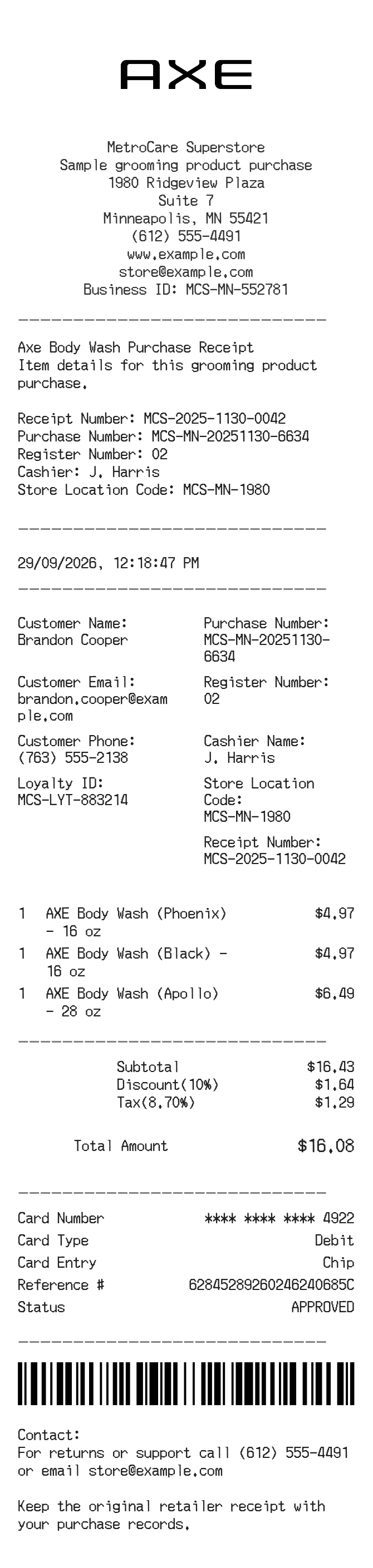
List the AXE products, scents and bottle sizes in your purchase. Add the seller’s details, check the item amounts and arrange the receipt before downloading.
✏️ Editable fields📱 PDF & Image export⚡ Instant preview
📝Editor
👁️Live Preview
Last updated
Keep each scent and bottle size on its own line
The AXE layout starts with several body wash items and a separate store header. It gives you room to distinguish a Phoenix bottle from a Black or Apollo variant, add the size and record quantities. The store, customer and checkout references are editable too, so the product brand does not have to double as the seller’s name.
What goes where
| Section | Details |
|---|---|
| Header | Seller name, address and contact details |
| Products | AXE range, scent, bottle size, quantity and unit price |
| Checkout | Receipt, purchase, register and cashier references |
| Amounts | Item totals with the selected discount and tax rates |
| Payment | Cash or card details and a closing message |
Related receipt guides
Build a clear product list
- Replace the example store and customer details with the information you want on the record.
- Use one item row per product size or scent. Enter the unit price; the item section multiplies it by the quantity.
- Review discount and tax rates against your purchase. These are editable settings, not a current AXE offer.
- Check repeated receipt references in the message and information sections, then save the PDF or PNG.