Wire Transfer Receipt Template
Arrange sender, recipient and receiving-bank details with the transfer amount and fee. Add the references, review the sections and download the record.
✏️ Editable fields📱 PDF & Image export⚡ Instant preview
📝Editor
👁️Live Preview
Last updated
Room for bank details on both sides of a transfer
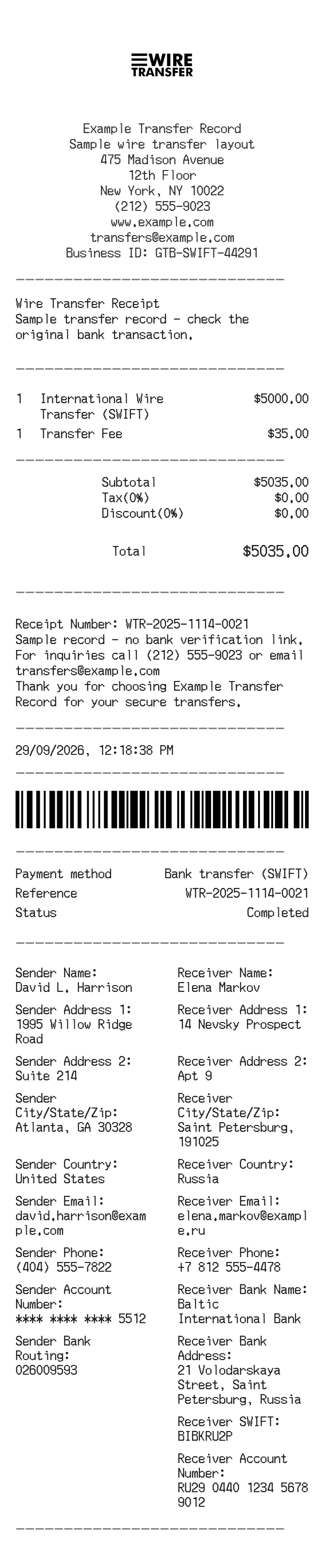
This wire-transfer layout has two information columns for sender and receiver details, including the receiving bank, SWIFT reference and account text. The amount and fee can be shown as separate item rows. Other sections hold the date, payment references and notes, so you can organize a detailed record without connecting to a bank.
Sections you can change
| Section | Details |
|---|---|
| Sender | Name, contact details, account and routing information |
| Receiver | Name, contact details, bank, SWIFT and account information |
| Amounts | Transfer and fee rows with quantities and unit prices |
| References | Bank reference, transaction ID and status notes |
| Layout | Header, date, messages and optional barcode |
Check the fee and references before export
- Replace the sample bank and party information in the header and two-column section.
- Enter the transfer amount and fee as separate rows when both belong in the displayed total.
- Review the item-section quantity, discount and tax settings. Other payment-status and reference notes remain manual text.
- Check the full document for repeated dates, references and sample messages, then save the PDF or PNG.