Check your FARFETCH account, app and order emails for purchase records. Keep copies of the invoice and any customs documents supplied; account history is not a guaranteed permanent archive.
This guide covers Farfetch receipts: how to find them across the app and website, why the partner boutique detail matters for authentication, and how to recreate a Farfetch-formatted invoice using the Farfetch receipt template.
How to Get Your Farfetch Receipt — 3 Methods
Method 1: Farfetch.com Order History
- Sign in at farfetch.com
- Click your profile icon
- Select My Orders
- Find the order
- Click Order Details
- Click Download Invoice
Save the invoice and any customs documentation available for the order. If a document is missing, request it from FARFETCH customer service.
Method 2: Farfetch App
- Open the Farfetch app
- Tap your profile
- Tap My Orders
- Find the order
- Tap to view receipt and tracking
The app provides the same order history with mobile-friendly receipt sharing.
Method 3: Email Order Confirmation
Every Farfetch purchase triggers an immediate confirmation from no-reply@farfetch.com. The email contains the order number and basic transaction summary. The downloadable PDF from your account is more detailed and is the version to keep.
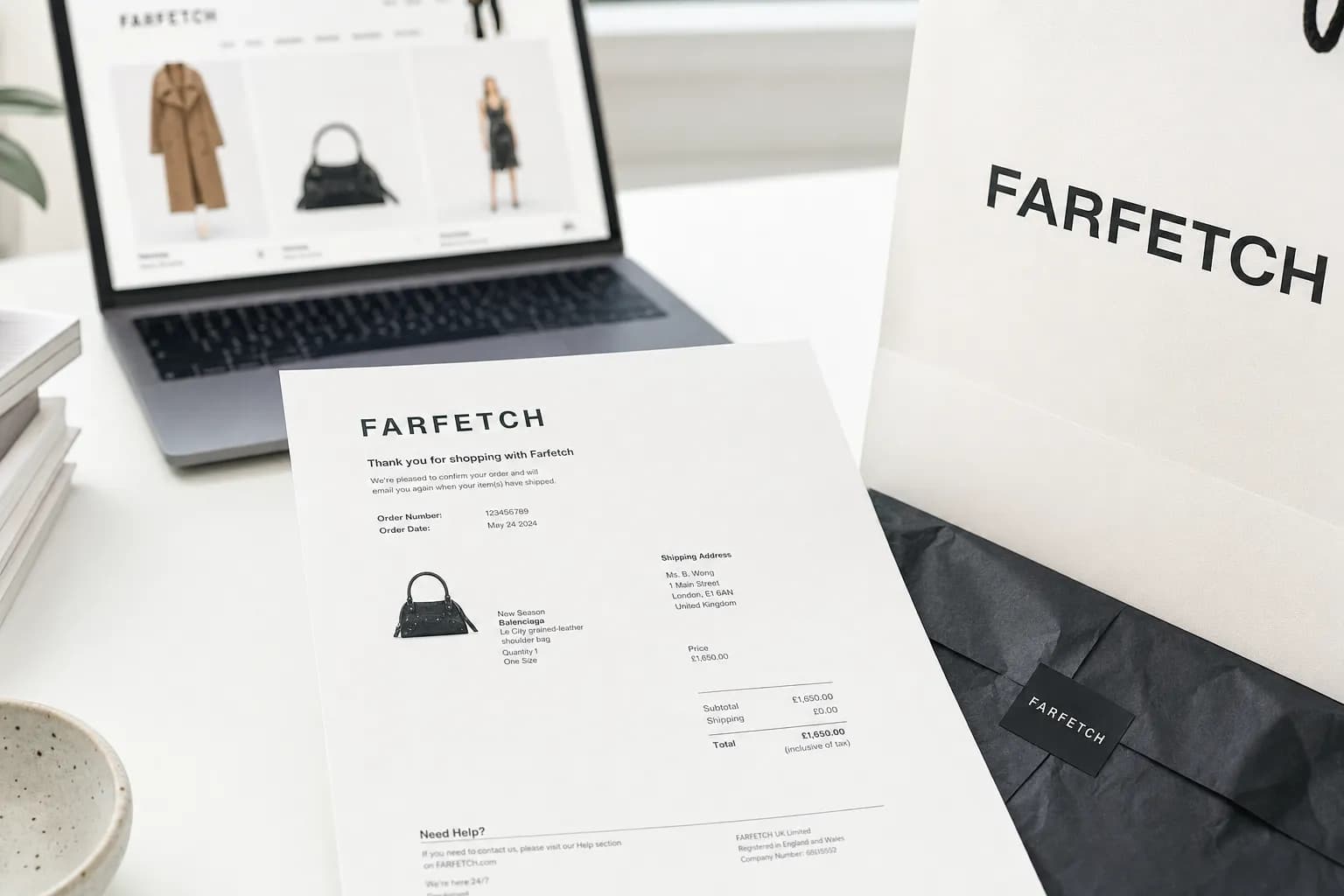
What's on a Farfetch Receipt
| Field | Details |
|---|---|
| Order number | Unique Farfetch transaction ID |
| Order date | Date of purchase |
| Partner boutique | The originating boutique (e.g., Browns London, LuisaViaRoma Florence) |
| Item details | Designer brand, product name, color, size |
| Designer SKU | Original brand's product code |
| Sale price | Item price |
| Shipping | Cost from boutique to your address (often international) |
| Customs / duties | For cross-border orders (declared in PDF) |
| Sales tax / VAT | Depending on origin and destination |
| Total | Final amount charged |
| Payment method | Card type and last 4 digits |
| Shipping address | Delivery destination |
Why the Partner Boutique Detail Matters
FARFETCH works with luxury brands and partner boutiques. Check the seller or partner identified in your order documents and retain those details. This matters because:
- Purchase history — the documents help identify the seller; authentication of the physical item is a separate question
- Returns processing — follow FARFETCH's labels and package items from different brands or partners separately as instructed
- Warranty claims — ask FARFETCH or the relevant brand which service channel and documents apply
- Customs documentation — retain the supplied shipping documents and follow the requirements for the shipment and destination
Farfetch Return Policy
- Standard eligible returns: FARFETCH’s FAQ states 30 days from delivery, with conditions and exceptions.
- Unworn condition required: all original packaging, tags, and authenticity cards
- Final sale items: non-returnable (clearly marked at checkout)
- Personalized items: non-returnable
- Return shipping: free in most regions via Farfetch label
- Refund timing: The FAQ allows up to 6 calendar days for return processing after receipt, then up to 14 days for the payment provider to show the refund.
Start through Orders & Returns or the guest-order flow and follow the documentation instructions provided. FARFETCH customer-service FAQ (checked September 11, 2026).
Farfetch Receipt for Resale Authentication
An original invoice can help document where and when an item was purchased. It does not, by itself, authenticate the physical item or guarantee a resale price. Ask the buyer or resale service what evidence it needs.
Farfetch Receipt Template
The FARFETCH receipt template can format known transaction details. A personally prepared reconstruction should be labeled as such and kept with the underlying evidence. It is not a brand-issued duplicate or proof of authenticity; ask the receiving organization whether it will accept it. Its fields include:
- Farfetch standard header layout
- Order number and partner boutique fields
- Itemized designer items with brand, color, size, SKU
- Shipping and customs breakdown
- VAT/sales tax
- Payment method (last 4)
- PDF or PNG download
For other luxury brands and marketplaces, see Louis Vuitton, Dior, Cartier, Goyard, Saks Fifth Avenue, or browse the full luxury templates collection.
FAQs About Farfetch Receipts
How do I get my Farfetch receipt?
Open the order in your account or app and look for available invoice or order documents. For a guest order or missing invoice, use the FARFETCH customer-service FAQ and customer-service options.
Does Farfetch send a paper receipt with the order?
Keep any invoice and delivery documents supplied with the package. FARFETCH says customs-clearance invoices are still included when required; contact support if the document you need is missing.
Why does the Farfetch invoice show a boutique partner, not Farfetch?
Check the seller or partner named on your order and invoice. FARFETCH coordinates support, but return and product documentation depend on the specific order.
How long does Farfetch keep order history?
Save your own complete copies; do not assume account history will remain available indefinitely. For an older or missing transaction, ask the retailer what records it can retrieve.
Are Farfetch receipts accepted for designer authentication?
An original invoice can help document where and when an item was purchased. It does not, by itself, authenticate the physical item or guarantee a resale price. Ask the buyer or resale service what evidence it needs.
How do I print a Farfetch receipt?
Sign in at farfetch.com, go to My Orders, click the order, then Download Invoice. The downloaded PDF is print-ready. The Farfetch app also has a share function for mobile printing.
Can I use my Farfetch receipt for customs declarations?
Keep any invoice and customs documents supplied for your order. Ask the customs authority or insurer which records it needs; an invoice format alone does not guarantee acceptance.
What if my Farfetch order is damaged or wrong?
Report an incorrect, damaged or missing item to FARFETCH customer service promptly with the order details and relevant photos. Follow its instructions for your case; do not assume every issue has a 14-day claim deadline. FARFETCH customer-service FAQ.