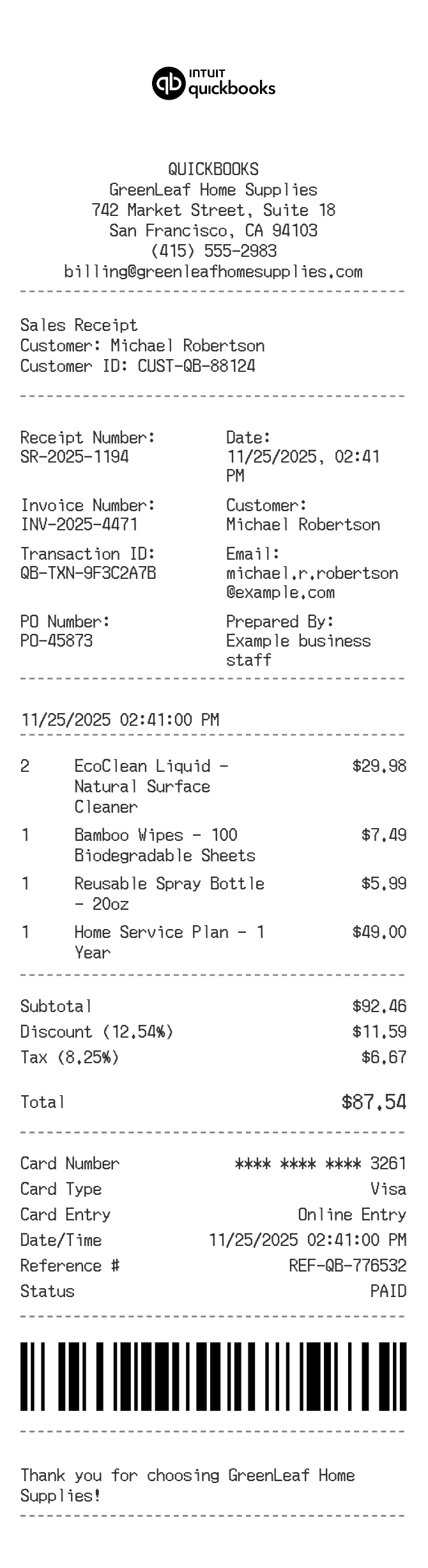
About the QuickBooks Receipt
QuickBooks receipts are sales receipts or invoices generated through Intuit's QuickBooks accounting software. They document a completed transaction, including line items, quantities, prices, taxes, and payment details. Businesses recreate or reprint these documents when a client requests a copy, when records are lost during a software migration, or when proof of payment is needed for expense reporting or reimbursement purposes.
QuickBooks in Numbers
QuickBooks is developed by Intuit, founded in 1983 and headquartered in Mountain View, California. QuickBooks launched in 1992 and has grown into one of the most widely used small-business accounting platforms in the US, serving millions of businesses across its desktop and cloud-based versions. Intuit also owns TurboTax and Mint.
What Is On a QuickBooks Receipt
| Section | Details |
|---|
| Section | Details |
| Business Header | Company name, logo, address, phone, email, and website |
| Document Info | Receipt or invoice number, issue date, and due date if applicable |
| Customer Info | Client name, billing address, and shipping address if different |
| Line Items | Product or service name, description, quantity, unit price, and line total |
| Subtotal & Discounts | Subtotal before tax, any discount amount or percentage applied |
| Tax | Tax rate name (e.g., Sales Tax), percentage, and calculated tax amount |
| Total & Payment | Grand total, payment method, and amount paid or balance due |
| Footer / Memo | Custom message, terms, thank-you note, or internal memo added by the business |
Using a QuickBooks Receipt
- QuickBooks receipts serve as proof of payment for services or goods sold; keep a copy on file for tax and audit purposes.
- If a client disputes a charge, the receipt number and line-item detail can be matched against your QuickBooks transaction history.
- Reprinting is straightforward inside QuickBooks: locate the transaction, click Print or Email, and send as a PDF.
- For businesses that have switched platforms or lost access to their account, a recreated receipt should match the original in item detail, totals, and dates to remain useful for reimbursement or bookkeeping.
FAQs
What is the difference between a QuickBooks sales receipt and an invoice?
A sales receipt records immediate, full payment at the time of sale. An invoice is sent when payment is expected later. Both include similar fields but a sales receipt shows the transaction as closed, while an invoice may show a balance due.
How do I reprint a QuickBooks receipt?
In QuickBooks Online, go to Sales, find the transaction, open it, and use the Print or Preview option to download a PDF. In QuickBooks Desktop, open the Customer Center, locate the sales receipt, and select File then Print.
What information do I need to recreate a QuickBooks-style receipt?
You need the business name and contact details, customer name and address, the date of the transaction, each line item with description and price, the applicable tax rate, and the payment method. The receipt or invoice number should match the original if possible.
Can I customize the layout of a QuickBooks receipt?
Yes. QuickBooks allows businesses to add a logo, change colors, reorder fields, and add a custom footer message through the Custom Form Styles settings. ReceiptEdit lets you replicate that same customized look when you need a standalone copy.
Related Templates