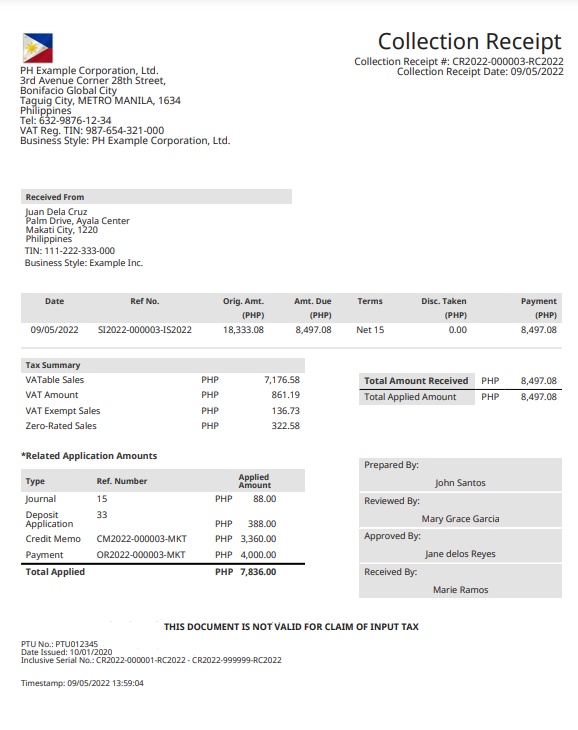
This collection receipt template follows a complete English Philippine sample published in Oracle’s documentation. It records money collected against an invoice and separates earlier applications from the current payment. The printed warning about input-tax claims remains part of the layout.
EDITOR
Edit your receipt below, then download the same clean layout as PDF or PNG. Enter amounts and totals manually.
The example starts with a PHP 12,000.00 invoice. Four earlier applications total PHP 4,000.00, leaving PHP 8,000.00 collected here. Its tax summary is PHP 6,500.00 taxable sales + PHP 780.00 VAT + PHP 400.00 exempt sales + PHP 320.00 zero-rated sales. All entries are manual.
| Step | Details |
|---|---|
| 1 | Enter the issuer, payer, receipt reference and date. Check the invoice reference and original amount. |
| 2 | Reconcile the earlier application rows, outstanding amount, current payment and tax summary. |
| 3 | Review the printed receipt names and registration details, then export the complete page. |
The selected document is a collection receipt. It expressly states that it is not valid for a claim of input tax. Editing the layout does not register a document or replace an issuer’s tax invoice.
It follows an English Philippine collection receipt in Philippine pesos (PHP), with separate VAT, exempt and zero-rated sales rows.
No. All amounts are manual. Keep the earlier applications separate from the current Total Applied Amount and reconcile both against your invoice record.
No. They are editable printed names. The editor does not authenticate approvals, signatures, payment or the registration details in the footer.
The source’s Philippine flag image is retained. Upload a business image to replace that slot; removing it restores the source artwork.