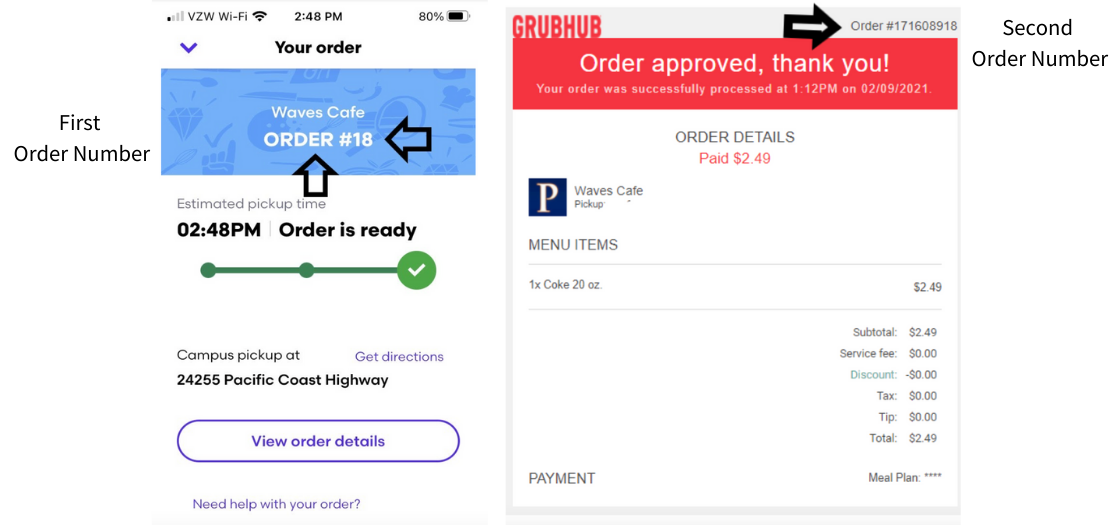
This Grubhub campus-dining receipt follows the full approved-payment panel published in Pepperdine’s order-number guide. It keeps the merchant and restaurant logos, red approval banner and separate paid amount above the item and totals.
EDITOR
Edit your receipt below, then download the same clean layout as PDF or PNG. Enter amounts and totals manually.
The complete receipt panel shows a Waves Cafe pickup purchase, one menu item, a fee and discount breakdown, and a masked meal-plan payment. The separate order-ready app screen in the reference guide is comparison context and is not part of this receipt.
| Step | Details |
|---|---|
| 1 | Enter the order reference, processed timestamp and restaurant details. |
| 2 | Fill the single quantity-and-description row and its price. |
| 3 | Reconcile subtotal, service fee, discount, tax, tip and the shared paid total. |
| 4 | Set the payment label, review both merchant marks and export PDF or PNG. |
The institutional guide distinguishes the app pickup number from the longer Grubhub receipt number. This layout edits the receipt number in the upper-right corner.
Yes. The payment control follows the source’s masked Meal Plan label. It is text only and does not connect to a dining balance or payment account.
The chosen receipt is for Waves Cafe campus dining. Its restaurant mark remains separate from the Grubhub logo; either can be replaced, and removing the upload restores its original artwork.
No. Check your Grubhub order history or original receipt email, or contact Grubhub support about the actual order. This editor creates a local document.